User documentation
- Version:
101
- Date:
Oct 03, 2026
This book is for the person who runs cloonix: the items, the commands, the
canvas, the guest images, the configuration keywords. The
developer book is for the person who changes it.
The handle of cloonix: one command line
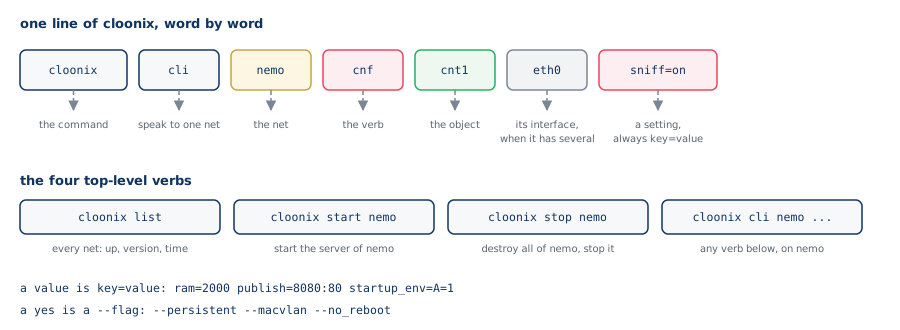
Everything in this book is done with lines of this shape. The chapter The
command line, one page has all of it on one page. Two containers on one
lan, and a ping, with the net nemo started (cloonix start nemo, in a
terminal of its own):
cloonix cli nemo add cnt cnt1 eth=1 trixie
cloonix cli nemo add cnt cnt2 eth=1 trixie
cloonix cli nemo plug cnt1 eth0 lan1
cloonix cli nemo plug cnt2 eth0 lan1
cloonix cli nemo ssh cnt1 "ip addr add dev eth0 1.1.1.1/24"
cloonix cli nemo ssh cnt1 "ip link set dev eth0 up"
cloonix cli nemo ssh cnt2 "ip addr add dev eth0 1.1.1.2/24"
cloonix cli nemo ssh cnt2 "ip link set dev eth0 up"
cloonix cli nemo ssh cnt1 "ping -c 3 1.1.1.2"
cloonix cli nemo del all
From a real network to its model
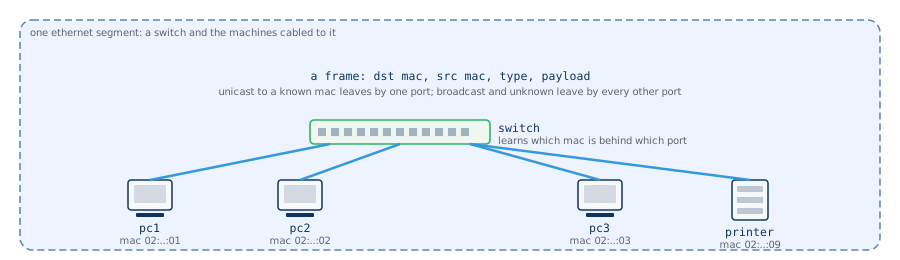
A network is machines talking to each other through cables. The smallest
one is a switch and the machines cabled to it: one ethernet segment.
Every interface on it has a mac address; a frame carries the mac of its
destination and the mac of its source; the switch learns which mac is
behind which port and forwards a unicast frame by that port alone, a
broadcast or an unknown destination by every other port. A pc, a printer,
a server on the same segment reach each other with nothing but that.
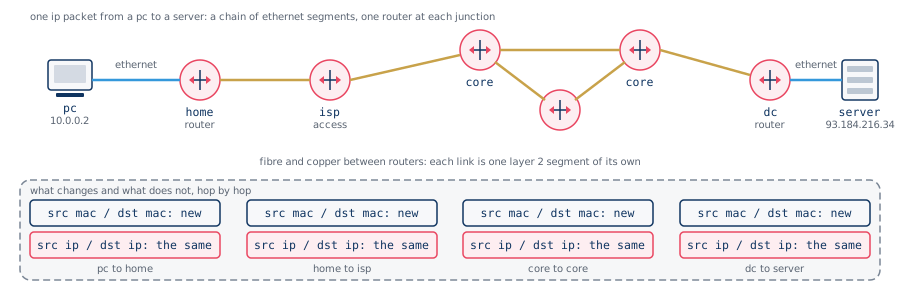
The internet is not one segment. It is a chain of them, and at every
junction stands a router, a machine with an interface on each of the
segments it joins. A packet from a pc to a server crosses the segment of the
home, the access link of the provider, a few links between core routers, the
segment of the data centre. On each link the packet travels inside a new
frame, addressed to the mac of the next router; the ip addresses inside it
stay the same from the first segment to the last. That is the division of
work between the two layers: ethernet moves a frame across one segment, ip
moves a packet across many.
Each router decides the next segment by its routing table, and the routing
tables are kept up to date by routing daemons talking to each other: ospf
inside one operator, bgp between operators. A name is turned into an address
by dns servers somewhere on that same graph, an address is handed out by a
dhcp server, a tunnel or a firewall stands on some link. Every piece of the
internet is a machine, a cable or a program running on a machine.
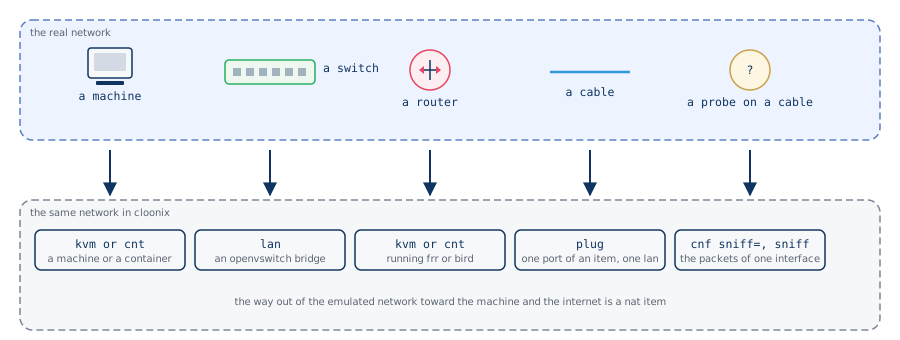
Cloonix builds this on one computer. Each real piece has one item of the
model:
a machine is a kvm, a virtual machine with its own kernel, or a
cnt, a container with a network stack of its own
a switch and its cables are a lan, an openvswitch bridge: a frame
entering by one port leaves by the port that learnt the destination, or
by every other port when it is broadcast or unknown, as on the real
switch
a router is a kvm or a cnt with several interfaces, running the routing
daemon a carrier runs, frr, or the kernel forwarding alone
a cable is plug: one interface of one item plugged into one lan
a probe on a cable is sniff on one interface, the packets handed back
with the capture filter applied in the switch
the way out toward the real internet is a nat item
The path of the figure above becomes, in cloonix, one container per
machine and one lan per cable:
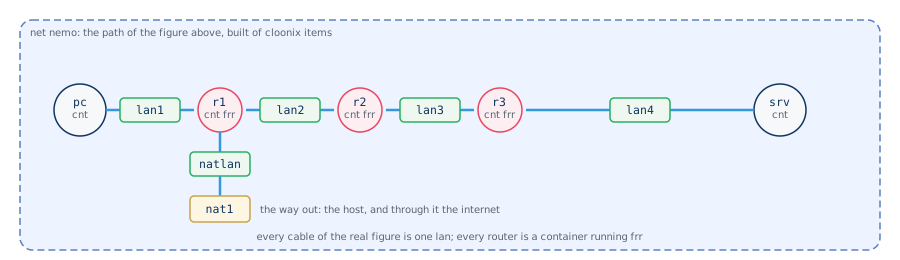
cloonix cli nemo add cnt pc  eth=1 trixie
cloonix cli nemo add cnt r1  eth=3 frr_trixie
cloonix cli nemo add cnt r2  eth=2 frr_trixie
cloonix cli nemo add cnt r3  eth=2 frr_trixie
cloonix cli nemo add cnt srv eth=1 trixie
cloonix cli nemo add nat nat1
cloonix cli nemo plug pc  eth0 lan1
cloonix cli nemo plug r1  eth0 lan1
cloonix cli nemo plug r1  eth1 lan2
cloonix cli nemo plug r2  eth0 lan2
cloonix cli nemo plug r2  eth1 lan3
cloonix cli nemo plug r3  eth0 lan3
cloonix cli nemo plug r3  eth1 lan4
cloonix cli nemo plug srv eth0 lan4
cloonix cli nemo plug r1  eth2 natlan
cloonix cli nemo plug nat1 natlan
Nothing in it is simulated: the frames on lan2 are ethernet frames on a
bridge, the routing table of r2 is the one frr computed, and a capture on
r2 eth1 shows the mac of r3 as destination and the ip of srv
unchanged, as it would on the wire. The chapters that follow describe the
program that builds this, then each item, then the demos, which are such
networks written down.
Architecture
Cloonix is a suite of C daemons and one python client that builds emulated
networks of virtual machines and containers, and uses these external
projects, all compiled into the delivery:
qemu-kvm for the virtual machines
openvswitch for the lans
crun for the containers
passt for the nat
the dissection engine of wireshark, without Qt, for the capture viewer
Nothing comes from the host: every binary and library used by cloonix is in
/usr/libexec/cloonix/cloonfs. The host does not need qemu, openvswitch,
crun, passt or wireshark installed.
The chapter The open sources cloonix is built on says where each of them
comes from and who wrote it.
The demos in demos/ are the second use of cloonix: a topology that costs a
few lines of python and a few seconds to build, on which routing, addressing,
tunnels, proxies and capture are shown with the real open source daemons.
The chapter Learning with cloonix is the entry to them.
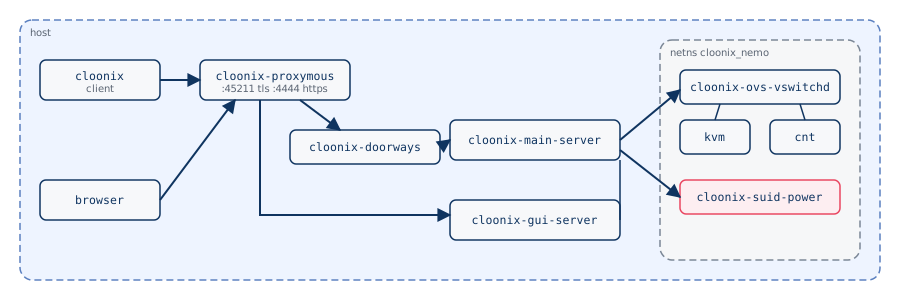
One net is one server, cloonix-main-server, started by cloonix start
<net> with a net name taken from cloonix.cfg. It holds the topology,
forks the helpers, and is reached in two ways:
cloonix cli <net> ... over one tcp port, 45211, every frame carrying
an hmac of the net password.
a browser over one https port, 4444, with the net name and its password:
user nemo, password nemoclown, in
/usr/libexec/cloonix/cloonfs/etc/cloonix.cfg.
Both ports are bound by cloonix-proxymous, which ends the tls and hands
the bytes on over unix sockets: the doors frames to cloonix-doorways,
which checks the hmac and reaches the main server, the http to
cloonix-gui-server.
The lans and the guest interfaces live in a private network namespace,
cloonix_<net>, where cloonix-ovs-vswitchd runs. Privileged operations
go through cloonix-suid-power, the single setuid binary of the delivery.
The client is one command, cloonix, a python file using the standard
library only, with a helper file beside it for each large verb. It runs as it
is on linux, macos and windows. The top level has four verbs:
cloonix list              this client, and every server that answers
cloonix list                 every net of the config, and its answer time
cloonix start <net>            start a server on this machine
cloonix cli <net> <verb> ... everything done to one net
Directories of a running net:
/var/lib/cloonix/bulk        guest root file-systems
/var/lib/cloonix/<net>       work directory of the net
Two ways to install
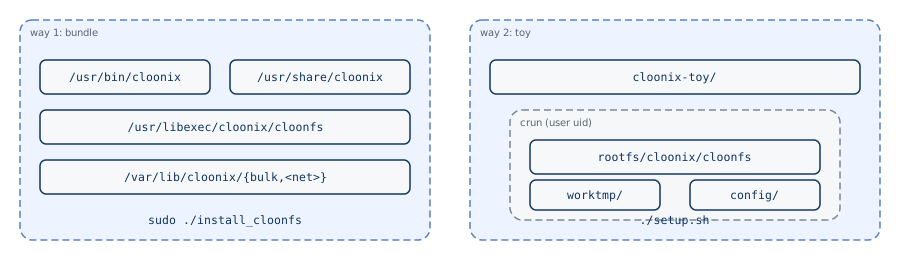
Way 1, the bundle, cloonix-bundle.tar.gz: root once, at install
time, to write /usr/libexec/cloonix/cloonfs, /usr/bin/cloonix and the
setuid bit of cloonix-suid-power. Cloonix then runs as ordinary processes
of the user.
Way 2, the toy, cloonix-toy.tar.gz: no root at install, no root
at run. Cloonix itself runs inside a crun container created by the user, and
everything stays under the extracted directory.
Same verbs, same canvas, same demos in both. The crun of the toy wraps
cloonix; it is distinct from the crun containers cloonix creates for the
cnt guests, which exist in both ways.
One tree of libraries
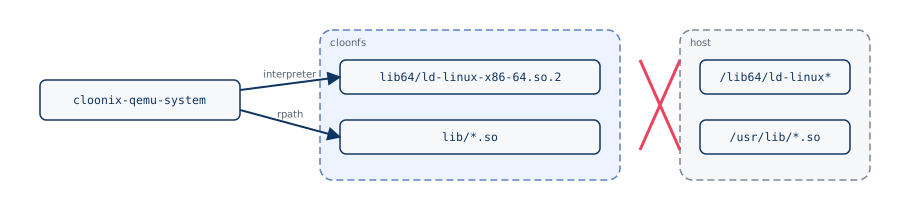
At packing time every binary and library of the delivery is rewritten with
patchelf: the interpreter points at the loader inside cloonfs, the
rpath at the library directories inside cloonfs. No cloonix binary opens
/lib64/ld-linux-x86-64.so.2 or anything under /usr/lib. The same tar.gz
runs on debian, fedora, arch, and on a distribution released after the build.
Removing /usr/libexec/cloonix removes cloonix.
User view
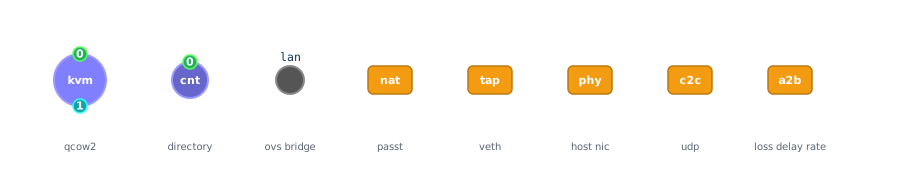
The items, all cabled to each other through a lan:
kvm   virtual machine driven by qemu-kvm, rootfs is a qcow2 file of bulk
cnt   container driven by crun, rootfs is a directory of bulk
nat   the way out toward the internet, built on passt
tap   a veth pair giving cloonix an interface in the host
phy   a physical interface of the host brought into cloonix
c2c   a cable to another cloonix net, over udp
a2b   a cable that degrades what crosses it: loss, delay, rate
lan   the crossroad, an openvswitch bridge
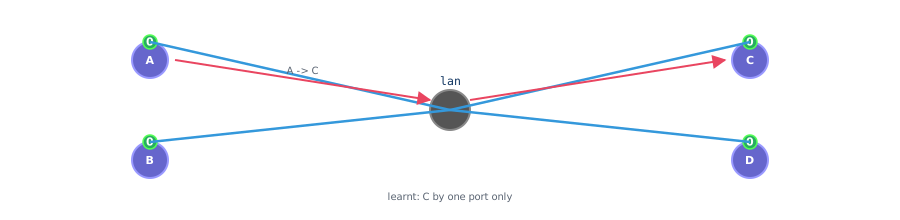
An item owns ports, one cable per port, each cable going to a lan. A lan
is a learning bridge: a frame whose destination is known leaves by one port,
an unknown or broadcast one leaves by every other port.
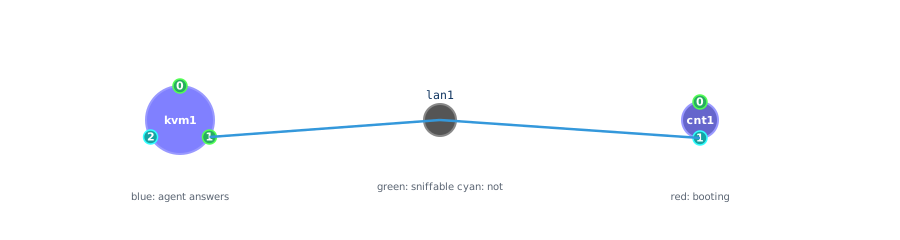
A machine is a circle, big for a kvm, smaller for a cnt. The numbered dots on
its border are the interfaces: green when capturable, cyan when not. Four
gestures on the canvas:
double-click a lan, then single-click a port     the cable is created
double-click a machine                            root shell in a panel
double-click a green port                         webshark on that interface
right-click a kvm, Desktop                        noVNC desktop
Where things are
Way 1, the bundle:
/usr/bin/cloonix                       the client
/usr/bin/cloonix_*.py                  its helpers, one per verb
/usr/libexec/cloonix/cloonfs           binaries, libraries, cloonix.cfg
/usr/libexec/cloonix/insider_agents    the agent discs given to the guests
/usr/share/cloonix/demos               the demos
/usr/share/cloonix/pcap                captures written by PcapRec
/usr/share/cloonix/cert                certificate of the https port
/var/lib/cloonix/bulk                  guest root file-systems
/var/lib/cloonix/<net>                 work directory of a net
Way 2, the toy, after tar xvf cloonix-toy.tar.gz:
cloonix-toy/rootfs            the crun root holding cloonfs
cloonix-toy/config            config.json and the certificate
cloonix-toy/bin               the few host-side binaries
cloonix-toy/worktmp           crun state and crun.log
cloonix-toy/<net>cmd          the command script written by setup.sh
Content
The demos: networking culture
- 1. Learning with cloonix
- 2. Package 0 -- The first network
- 3. Package 1 -- The cloonix items
- 4. Package 2 -- One wire, and what rides it
- 5. Package 3 -- Addresses, names, time
- 6. Package 4 -- Routing
- 7. Package 5 -- Encryption and tunnels
- 8. Package 6 -- The edge
- 9. Package 7 -- Services
- 10. Package 8 -- Staying up
- 11. Package 9 -- Overlays and the real network
- 12. Package 10 -- Wifi
- 13. Package 11 -- Other guests
- 14. The open sources cloonix is built on
- 15. Wifi: from the radio to the ip stack
- 16. Switching: vlans, spanning tree, overlays
- 17. Addresses, names, time
- 18. Routing
- 19. Encryption, tunnels, filtering
- 20. Services and availability
- 21. The wifi demos
- 22. Other guests: freebsd, windows, cisco