User documentation ‹ 4. Host system required customisation › 6. The first network
5. Instructions for installation
This chapter is way 1, the bundle: root once at install time, cloonix in /usr/libexec/cloonix/cloonfs, run as ordinary processes of the user. Way 2, the toy, is the next chapter. Both are plain tar.gz files with no package to install as a prerequisite.
5.1. Installing the bundle
wget https://clownix.net/downloads/cloonix-bundle.tar.gz
tar xvf cloonix-bundle.tar.gz
cd cloonix-bundle
sudo ./install_cloonfs
What install_cloonfs does:
rm -f /usr/bin/cloonix*                      no name of an older release survives
/usr/libexec/cloonix/cloonfs                 binaries, libraries, etc/cloonix.cfg
/usr/libexec/cloonix/insider_agents          the three agent discs
/usr/libexec/cloonix/startup_bin             the nine shell tools the init of the toy uses
/usr/bin/cloonix  /usr/bin/cloonix_*.py      the client and its helpers
/usr/share/cloonix/demos                     sticky, shipped demos owned by root
/usr/share/cloonix/pcap                      sticky
/usr/share/cloonix/cert                      certificate copied from the tarball
/var/lib/cloonix                             created, sticky
/var/lib/cloonix/bulk                        created, mode 777
chmod u+s cloonix-suid-power                 the one setuid binary
The helpers beside the client: cloonix_files.py the two panes, cloonix_demo.py the demo player, cloonix_atop.py the ascii topology, cloonix_completion.py the words a tab offers, cloonix_config.py the nets.
Nothing else is asked of the user: every account of the machine can start a net, the passwords and the certificate key are readable. What can be closed, and how, is the section Hardening after the install of the chapter Safety and attack surface; each of its steps is optional. If a group named cloonix already exists on the machine, the install says so, since that group is the switch of the gate on cloonix-suid-power.
An installed certificate is kept by a reinstall, because a browser refuses a second certificate for a host and port it already trusts. To take the one of the tarball anyway:
sudo CLOONIX_REPLACE_CERT=1 ./install_cloonfs
5.2. Guest download
The installation brings no guest. The server looks for them in bulk:
/var/lib/cloonix/bulk/<name>.qcow2       kvm root file-systems
/var/lib/cloonix/bulk/<name>/            cnt root file-systems
For the kvm guests:
mkdir -p /var/lib/cloonix/bulk
cd /var/lib/cloonix/bulk
wget https://clownix.net/downloads/kvm_bulk/trixie.qcow2.gz
gunzip trixie.qcow2.gz
For the cnt guests, the tar.gz as downloaded:
cd /var/lib/cloonix/bulk
wget https://clownix.net/downloads/cnt_bulk/trixie.tar.gz
For the frr demos:
cd /var/lib/cloonix/bulk
wget https://clownix.net/downloads/cnt_demo_bulk/frr_trixie.tar.gz
The images are in four directories of https://clownix.net/downloads.html, which lists every file:
downloads/cnt_bulk/<image>.tar.gz         the distributions, as containers
downloads/kvm_bulk/<image>.qcow2.gz       the distributions, as machines, and the desktops
downloads/cnt_demo_bulk/<image>.tar.gz    one container image per subject of the demos
downloads/kvm_demo_bulk/<image>.qcow2.gz  the machine images of the demos
They are what vm_create/allbulk.sh of the source tree builds and delivers.
add cnt ... trixie takes the directory trixie when it is in bulk, and
trixie.tar.gz otherwise: the first container asking for it extracts the
archive, once, into trixie_targz, shared by every net and every user of
the machine, and the container is created on it; the wait is the extraction.
The topology names the container's image trixie_targz. That tree is never
modified: cloonix mounts it read only for each container, and it must not be
edited by hand, it stays what trixie.tar.gz holds. A tar.gz image is never
persistent: --persistent is answered with the directory form to make,
tar xvf trixie.tar.gz in bulk, which then comes first; a copy under
another name, cp -a trixie_targz mytrixie, does as well.
Whoever unpacks it, sudo or not, the image is used as it is: a
container sees it with its owner's ids translated into those of the user who
started the net. The chapter on the guest root file-systems has the builders.
A guest named on an image that is not in bulk is refused, and the refusal names the builder script of vm_create that makes it, in cnt_kvm/ or cnt_kvm_demo/, or the download:
REFUSED by the cloonix server at 127.0.0.1:45211
  asked : add cnt c1 eth=1 wg_trixie
  reason: wg_trixie is not in /var/lib/cloonix/bulk, as a directory or as
          wg_trixie.tar.gz: build it with cnt_wg_trixie.sh of vm_create,
          or take wg_trixie.tar.gz from https://clownix.net/downloads.html
          and put it there, cloonix extracts it
A demo prints that line as its first and stops.
5.3. First run

Start the server:
cloonix start nemo
Open the canvas:
https://127.0.0.1:4444
From another machine, the address of the server:
https://<ip>:4444
The browser warns once about the self-signed certificate, then asks for a user and a password.
The web page asks for a user and a password. They are not secret, they are shipped in the configuration, and they can be changed there:
https://127.0.0.1:4444      user  nemo      password  nemoclown

the file, bundle      /usr/libexec/cloonix/cloonfs/etc/cloonix.cfg
the file, toy         <toy directory>/rootfs/cloonix/cloonfs/etc/cloonix.cfg
The user is the name of the net, the password its cloonix_passwd in that file: the name of the net followed by clown. For the net nemo: user nemo, password nemoclown.
Two machines and a ping:
cloonix cli nemo add kvm kvm1 ram=1000 cpu=2 eth=1 trixie.qcow2
cloonix cli nemo add kvm kvm2 ram=1000 cpu=2 eth=1 trixie.qcow2
cloonix cli nemo plug kvm1 eth0 lan1
cloonix cli nemo plug kvm2 eth0 lan1
cloonix cli nemo ssh kvm1 "ip addr add dev eth0 1.1.1.1/24"
cloonix cli nemo ssh kvm1 "ip link set dev eth0 up"
cloonix cli nemo ssh kvm2 "ip addr add dev eth0 1.1.1.2/24"
cloonix cli nemo ssh kvm2 "ip link set dev eth0 up"
cloonix cli nemo ssh kvm1 "ping -c 3 1.1.1.2"
The same nine lines, run by a program that waits for the guests and prints each line as it goes, are the demo cloonix/kvm.py, and its twin with two containers cloonix/cnt.py: the chapter The first network.
A guest answers ssh a few seconds after its creation. A script waits like this:
while ! cloonix cli nemo ssh kvm1 "echo" 2>/dev/null; do sleep 1; done
The same with two containers on a second lan:
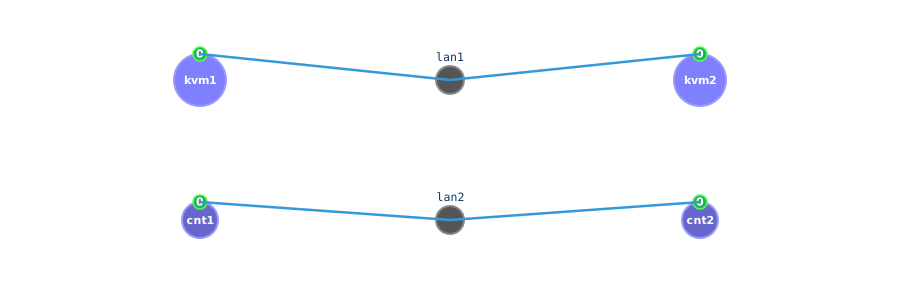
cloonix cli nemo add cnt cnt1 eth=1 trixie
cloonix cli nemo add cnt cnt2 eth=1 trixie
cloonix cli nemo plug cnt1 eth0 lan2
cloonix cli nemo plug cnt2 eth0 lan2
Erase every object, the server stays:
cloonix cli nemo del all
Stop the server:
cloonix stop nemo
5.4. Erasing cloonix from the host
sudo rm -rf /usr/libexec/cloonix
sudo rm -f /usr/bin/cloonix*
sudo rm -rf /usr/share/cloonix
sudo rm -rf /var/lib/cloonix
User documentation ‹ 4. Host system required customisation › 6. The first network