User documentation ‹ 8. Cloonix toy › 10. Two panes: cloonix cli files
9. The cloonix client
The chapter The command line, one page has every verb with an example; this chapter has every option, and how the client behaves.
One command, cloonix, one python file using the standard library only. The same file runs on linux, macos and windows; only cloonix start is local to the machine hosting cloonix. Helpers sit beside it and are imported by the verb that needs them:
cloonix_files.py         the two-pane screen
cloonix_demo.py          the demo player
cloonix_atop.py          dump drawing
cloonix_completion.py    the words a tab offers, the guided prompt
cloonix_config.py        the nets, their ports and passwords
Copied alone, the client keeps every verb but files, demo and dump drawing, offers no completion, and names its server with -s in place of the config; a verb whose file is absent says so in one line.
9.1. The verbs
~$ cloonix

usage: cloonix <verb> ...

Verb can be:
  list   every net of the config: up or not, its version, its time
  start  start the server of a net on this machine
  stop   destroy everything of a net and stop its server
  cli    do something to one net: cloonix cli <net> <verb> ...
~$ cloonix cli nemo

usage: cloonix cli <net> <verb> ...

Verb can be:
  demo      list the demos, or play one
  ssh       open a shell on a guest
  scp       copy files to or from a guest
  files     two panes: a guest and this machine, or two guests
  dump      read: config, topo, json, drawing, commands, pid, images, ip, namespaces, ovs-vsctl
  trace     debug: watch qemu, json_cli, crun, nspace -- or probe a guest
  add       add one object to the net
  del       delete one object, or all of them
  plug      put an interface on a lan, or a wlan on an air
  unplug    take an interface off its lan, or a wlan off its air
  cnf       configure an object: cnf <name> [<interface>] key=value
  sniff     receive the packets of an interface or of an air
  save      save a machine in qcow2
  rpc       send one json_interface.c message verbatim
The branches:
add   kvm | win | freebsd | cisco | cnt | tap | nat | a2b | c2c | phy
del   <name> | all
dump  config | topo | json | drawing | commands | pid | images | ip | namespaces | ovs-vsctl
trace qemu | json_cli | crun | nspace | probe <guest>
add phy <n> | macvlan
A value is always key=value and a --flag is always a yes: ram=2000, publish=8080:80, startup_env=VAR=1, but --persistent.
Options, all hidden from the help:
--wait <s>         the wait for an answer, set by the verb otherwise
-s, --server host:port:passwd   a server not in the config; then no net on the line
-h, --help, help   the usage of the verb the line has reached
--cfg <file>       another cloonix_config.py
--raw              the python traceback instead of the report
--completion       print the tab hook
--version          the same as *list*
--via-unix <path>, --complete and --complete-usage exist for the completion hook and for testing; the developer book has them.
9.2. A verb written short
A word of three letters at least that starts one word of its menu only is that word:
cloonix sta nemo                      start nemo
cloonix cli nemo unp cnt1 eth0 lan1   unplug cnt1 eth0 lan1
cloonix cli nemo dum top              dump topo
cloonix cli nemo tra qem              trace qemu
cloonix cli nemo add fre bsd1 ram=2000 eth=1 freebsd.qcow2
The rule applies at every place that has a menu of the client's own. A net, a guest, a lan, a path, an image and a number are typed whole. A short word fitting two verbs, or shorter than three letters, is not expanded. From a terminal the guide asks that place again; from a pipe or a script the line is refused where it stands:
~$ cloonix cli nemo sn
cloonix: no verb called 'sn'
  asked : sn
  where : net nemo
  reason: a verb may be written short, three letters at least, where
          they fit one verb only: 'sn' fits sniff
  try   : cloonix cli nemo sniff ...
9.3. A line short of a word
From a terminal, an incomplete line asks for the rest at a prompt of its own, with the choices and an example, runs, and the prompt is gone:
~$ cloonix cli nemo add cnt
cloonix cli nemo add cnt <name> [eth=N] [--persistent]
[startup_env=VAR=val] [vmount=spec] [wlan=N]
[mac_addr=ethN:xx:xx:xx:xx:xx:xx] <directory>
  for example:  cnt1
A wrong word is answered at the place that refused it, the tail dropped:
~$ cloonix cli nemo titi
'titi' is not one of these, so the line stops here:
  demo    list the demos, or play one
  ...
cloonix cli nemo
From a pipe or a script nothing asks: the line fails as it always did.
9.4. list
~$ cloonix list

+------------------------------------------------------------------------+
| net   ip               cli_port  https  resp_time  status               |
| ---------------------------------------------------------------------- |
| cucu  10.7.7.1         45217     4474   > 5s       timeout              |
| fido  127.0.0.1        45213     4464   0.000s     error Connection refused |
| mito  127.0.0.1        45212     4454   0.017s     version 101     |
| nemo  127.0.0.1        45211     4444   0.014s     version 101     |
+------------------------------------------------------------------------+
  client     101
  installed  101   /usr/libexec/cloonix
resp_time is the connect, the tls handshake and the reply of the server. list waits five seconds by default, list 0 prints the config only. The last lines are this client and what is installed on this machine, with a word when the config there and the one beside the client disagree.
A net that closes the socket on the tls client hello, a cloonix before this one or one without a certificate, is spoken to again in clear and the client says so on stderr:
cloonix: 127.0.0.1:45212 does not speak tls (closed the socket on the client hello), the connection is not encrypted
Any other failure of the handshake is not a missing tls: a timeout stays a timeout, and a handshake that fails otherwise is tried once more before the fallback, the reason in the message.
9.5. start and stop
cloonix start nemo
cloonix stop nemo
The net name is one of cloonix.cfg. start stays in the foreground. It creates /var/lib/cloonix/nemo, the namespace cloonix_nemo, the ovs instance, doorways, proxymous and, when the net has a cloonix_web port, the gui server. stop destroys every object of the net and the server; cloonix cli nemo del all destroys the objects and the server stays.
9.6. dump
cloonix cli nemo dump config        the work directory and the version
cloonix cli nemo dump topo          what exists, what kind, which lans join what
cloonix cli nemo dump json          the whole json of the topology
cloonix cli nemo dump drawing       the topology drawn in the terminal
cloonix cli nemo dump commands      the command lines that rebuild the net
cloonix cli nemo dump pid           every process of the net, cpu and rss
cloonix cli nemo dump images        what bulk holds, and whose it is
cloonix cli nemo dump ip nat1 vm1   the address the nat gave vm1
cloonix cli nemo dump namespaces    every namespace of those processes, how to enter each
cloonix cli nemo dump ovs-vsctl show   the openvswitch database, read only
dump images lists what add can take, the cnt directories, the tar.gz archives, the _targz directories extracted from them and the qcow2 files of bulk, each with its owner; a container is persistent only on an image owned by the user who runs the net, and the column says so. dump commands is how a session becomes a script: the adds, the cables, the captures, every setting (nat ports, a2b, caps, rstp, mac_mangle) and the places on the canvas, each line valid for a shell. dump pid names every process the server runs or watches: the guests, the ovs daemons, one snf and one dumpcap per capture, nat, a2b, c2c, doors, suid_power, proxymous, the gui server and the server itself.
~$ cloonix cli nemo dump topo
net nemo
  cnt  hostA                eth=1
  cnt  hostB                eth=1
  a2b  cable
  lans:
    lanA           hostA eth0 (eth-s), cable A (eth-s)
    lanB           cable B (eth-s), hostB eth0 (eth-s)
eth-s is an interface made capturable, eth-v one that is not; a lan listed with one member is flagged ONLY ONE END.
~$ cloonix cli nemo dump drawing
net nemo -- 3 objects, 2 lans

      +-------+
      | cable |
      |  a2b  |
      | 0   1 |
      +-+---+-+
        |   |
      +-+   +-+
      |       |
 +----+-+   +-+----+
 | lanA |   | lanB |
 +--+---+   +---+--+
    |           |
+---+---+   +---+---+
| hostA |   | hostB |
|  cnt  |   |  cnt  |
|   0   |   |   0   |
+-------+   +-------+
Each connected piece is drawn on its own; objects on no lan are named on one line. Past 24 objects or 24 lans, a drawing wider than the terminal, or more than ten cable crossings, the answer is one line naming the limit and dump topo for the rest.
dump namespaces reads /proc/<pid>/ns of every process of dump pid and groups them: one line per namespace of each kind, net, mnt, pid, uts, ipc, user, cgroup, with its members, then the nsenter that runs a command inside it. The namespaces cloonix was started in are marked; all the others are cloonix's own, the ovs one and one set per container:
~$ cloonix cli nemo dump namespaces
kind    id           members  (from /proc/<pid>/ns, one line per namespace)
net     4026531840   doors suid_power proxymous gui_server cloonix_server   <- where cloonix was started (the host)
net     4026532648   nemo_ovs cloonix-ovsdb-server cloonix-ovs-vswitchd Cloon1 Cloon2 cnt1 nat1
        enter:  sudo nsenter -t 21310 -n ip addr
net     4026532791   cnt1
        enter:  sudo nsenter -t 21455 -n ip addr
pid     4026532793   cnt1
        enter:  sudo nsenter -t 21455 -p -m ps aux
...
nsenter (util-linux) runs a command inside the namespaces of a target process -t <pid>:
  -n network   ip addr, ip route, ss -tunap, tcpdump
  -p -m pid    ps needs the pid AND the mount namespace, its /proc is there: nsenter -t <pid> -p -m ps aux
  -m mount     ls /, cat /etc/hostname
  -u uts       hostname;  -i ipc;  -U user;  -C cgroup
  -a           all of them, then a shell: sudo nsenter -t <pid> -a bash
sudo nsenter -t <pid of the ovs> -n ip link is the way to see the lans and the vhost ports from the host; a kvm guest is not a namespace, it is reached with cloonix cli <net> ssh.
The ovs tool runs on the server, read only, and its output comes back:
cloonix cli nemo dump ovs-vsctl show
cloonix cli nemo dump ovs-vsctl list Mirror
cloonix cli nemo dump ovs-vsctl list-br
The sockets are filled in by cloonix. The first word must be one of the read commands, and no option is taken: a word starting with - is refused. A set is refused at the server:
refused: this passthrough is read only
  ovs-vsctl takes: list show find get list-br list-ports list-ifaces
An empty capture is the case it exists for: an empty Mirror table means the snf port receives floods only.
9.7. trace
dump asks what the server has now; trace subscribes and prints what the server does from now on, until ctrl-c. Start the trace, then make the thing happen:
cloonix cli nemo trace qemu        the command line every kvm is created with
cloonix cli nemo trace json_cli    every json message received and sent
cloonix cli nemo trace crun        the two crun commands of every container
cloonix cli nemo trace nspace      the namespaces containers are given and give up
json_cli rx llid 12
{"fctident":"add_lan_endp","tid":0,"name":"cnt1","num":0,"lan":"lan1"}
crun cnt1
/usr/libexec/cloonix/cloonfs/bin/cloonix-crun --cgroup-manager=systemd --debug
--log=/var/lib/cloonix/nemo/log/crun.log --root=/var/lib/cloonix/nemo/crun
create --config=/var/lib/cloonix/nemo/cnt/cnt1/config.json cnt1
nspace cnt1
created cloonix_nemo_cnt1_0_3 crun_pid=4711 net:[4026532208]
mnt:[4026532210] uts:[4026532211] ipc:[4026532212] pid:[4026532213]
cgroup:[4026531835]=host user:[4026532207]
=host marks a namespace shared with the host; a container of the toy has no user line. The fifth kind subscribes to nothing:
~$ cloonix cli nemo trace probe cnt1
probe 'cnt1' through the cloonix at 127.0.0.1:45211
  tcp to proxymous     ok             something is listening
  hmac on the frame    ok             the cloonix_passwd of this net matches
  leg to 'cnt1'        ok             the server knows the guest and routed it
  agent + virtio       ok             the leg stayed up for 5.0s
  far end              silent         which is what cloonix-cxp-srv does
Exit codes: 0 the pipe is whole, 1 reached and wrong (CLOSED, WRONG, spoke first), 2 never reached.
9.8. rpc
One json message of json_interface.c, sent as written. Every other verb builds its message from the words of the line; rpc skips that step, so it reaches a message no verb spells and it sends a wrong one on purpose:
cloonix cli nemo rpc '{"fctident":"tap_add","tid":0,"name":"tap1"}'
cloonix cli nemo rpc '{"fctident":"del_name","tid":0,"name":"tap1"}'
cloonix cli nemo rpc '{"fctident":"no_such_message","tid":0}'
The argument is one string and must parse as json; the client refuses it otherwise. The answer is waited for as for any other mutation, so the third line fails: the server names the message in its syslog and acknowledges nothing. debug/sub_rpc.py is these four cases. trace json_cli prints the messages the verbs build, which is where to read the shape of one.
9.9. add kvm
cloonix cli <net> add kvm <n> ram=<mega> cpu=<nb> eth=<n> <rootfs.qcow2> [options]
eth=<n> gives the machine n interfaces, eth0 to eth<n-1>, born not capturable, the lighter way. cnf <n> eth<i> sniff=on makes one capturable, a mirror port then made for it, and cnf <n> eth<i> sniff=off undoes it. No eth= gives a machine with no interface. wlan=<n> gives it n radios, on an air not captured either: cnf <air> sniff=on captures it. Options:
ram=<n>                    megabytes, or 2G, 512M
--persistent               the writes go into the bulk file, no overlay
--no_qemu_ga               the guest has no qemu-guest-agent
--fullvirt                 rootfs on the ide bus
--uefi                     boot through OVMF, for a gpt disk
--no_reboot                no reboot at the end of an install
install_cdrom=<file>       boot on an installation iso
added_cdrom=<file>         a second cdrom, resolved against bulk
added_disk=<file>          a second disk
mac_addr=eth<n>:<6 bytes>  force the mac of one interface, repeatable
wlan=<n>                   n emulated wlan interfaces, on the air kvmwifi
An option outside the list is refused with the list. dump commands prints every one back, so a listed topology replays:
cloonix cli nemo add kvm vm1 ram=2000 cpu=4 eth=3 trixie.qcow2
cloonix cli nemo add kvm vm2 ram=2000 cpu=4 eth=3 trixie.qcow2 --persistent
cloonix cli nemo add kvm vm3 ram=2000 cpu=2 eth=1 trixie.qcow2 mac_addr=eth0:02:11:22:33:44:55
9.10. add win, add freebsd, add cisco
Three words for what a kind of disk always needs. dump commands prints a windows and a freebsd back with their word, a cisco as the kvm with --no_qemu_ga it is:
cloonix cli nemo add win Win1 ram=4000 cpu=2 eth=1 win.qcow2
cloonix cli nemo add freebsd bsd1 ram=2000 cpu=2 eth=1 freebsd.qcow2
cloonix cli nemo add cisco cisco1 ram=6000 cpu=4 eth=3 c8000v.qcow2
add win       ide rootfs, OVMF, added_cdrom=virtio-win.iso by default
add freebsd   the agent on a disc of its own
add cisco     add kvm --no_qemu_ga
A cisco has no agent and stays red on the canvas; the demos chapter has the serial console driver. The windows chapter has the preparation of the image.
9.11. add cnt
cloonix cli <net> add cnt <n> eth=<n> <directory> [options]
The directory is a root file-system in bulk, or a <directory>.tar.gz there when the directory is absent, extracted by cloonix at the first use into <directory>_targz, a tree that is never modified and never persistent. Options:
--persistent                          the writes survive the stop
wlan=<n>                              n emulated wlan interfaces, on the air cntwifi
startup_env="VAR=value [VAR=value]"   environment of pid 1
vmount="<host dir>:<guest path> [...]"  the host directory mounted there
mac_addr=eth<n>:<6 bytes>             force the mac of one interface
cloonix cli nemo add cnt cnt1 eth=1 trixie
cloonix cli nemo add cnt cnt1 eth=1 self_rootfs startup_env="NODE_ID=cnt1"
cloonix cli nemo add cnt cnt1 eth=1 trixie_systemd startup_env="CLOONIX_WITH_SYSTEMD=1"
cloonix cli nemo add cnt cnt1 trixie wlan=1
CLOONIX_WITH_SYSTEMD=1 is the one value read by cloonix: the init of the image runs. Without it a container runs no init; nothing is passed for that case. Any other variable is for the image: the same one started twice with a different value plays two roles. A mount is the host directory itself, read and write, and outlives the container; several go in one vmount= separated by a space, and a source that is not a directory the server sees is refused before anything is created. The demo cloonix/mount.py plays both. wlan= needs mac80211_hwsim loaded on the host, and hostapd and wpa_supplicant in the image.
Container uid 0 is the user who started the net. The image is mounted for each container with its owner's ids translated into his, so any directory of the bulk serves any user, several at once, and nothing in bulk is ever changed by cloonix; a missing /etc/subuid or /etc/subgid range is added for him. A net started by root has no container:
this net runs as root and a container needs a user: start it as a
user, cloonix start <net> without sudo
9.12. The other objects
cloonix cli nemo plug kvm1 eth0 lan1               a cable: item, interface, lan
cloonix cli nemo add tap tap1                      a veth pair, tap1 on the host
cloonix cli nemo add nat nat1                      egress only
cloonix cli nemo add nat nat1 publish=8080:80      host 8080 -> guest 80, tcp
cloonix cli nemo add nat nat1 publish=5353:53/udp
cloonix cli nemo add a2b cable
cloonix cli nemo add c2c nemo2fido fido            both ends, from the master
cloonix cli nemo add phy enp6s0
cloonix cli nemo add phy enp6s0 --macvlan
A lan appears with its first cable and disappears with its last. A plug of an interface cabled to another lan unplugs it from there first, and says so; a plug onto the lan it is on is done already. unplug finds the lan by itself, a lan given is checked. A lan or an air is never named like an interface, eth<i>, wlan<i>, A or B, so the word after the name is read one way only:
cloonix cli nemo plug kvm1 eth0 lan2
cloonix: kvm1 eth0 was on lan1, unplugged from it
cloonix cli nemo unplug kvm1 eth0                  take one interface off its lan
cloonix cli nemo del cnt1                          delete any object
cloonix cli nemo del all                           delete every object
cloonix cli nemo cnf pbx eth0 sniff=on             make the interface sniffable
cloonix cli nemo cnf pbx eth0 sniff=off            and not
cloonix cli nemo cnf cable A2B delay=100
cloonix cli nemo cnf cable B2A loss=100
cloonix cli nemo cnf cable A2B rate=100
cloonix cli nemo cnf cable A2B silentms=200
cloonix cli nemo cnf lan1 rstp=on                  the bridge runs rapid spanning tree
cloonix cli nemo cnf nat1 publish=9090:80
cloonix cli nemo cnf nat1 publish=none
cloonix cli nemo cnf nemo2fido "mac_mangle=02:11:22:33:44:55"
cloonix cli nemo cnf cnt1 cpu=25 ram=100           cap a running container
cloonix cli nemo cnf cnt1 cpu=0                    lift the cpu cap, ram kept
cnf takes the name, the interface or the direction where there is one, and the settings: the kind of the object is known from the keys, no two kinds sharing one. sniff= means "make sure it is on" or "off": asking for the state an interface is in is not an error.
cpu= ram= caps a running container: cpu in percent of one core, ram in megabytes, 0 for no cap, a cap not named left as it is. The answer is ok once the server has read the cap back from the cgroup of the container, so an ok is a cap in force; a privileged container has no cgroup and is refused, which is every container of the toy, and so is every container when the host has no systemd bus, since crun then cannot hand a cgroup to a user. Inside the container /sys/fs/cgroup/cpu.max and memory.max show it; the demo cloonix/limit.py measures it.
cloonix cli nemo cnf cnt1 x=300 y=200              centre of the item on the canvas, pinned
cloonix cli nemo cnf cnt1 eth0 angle=90            eth0 at 90 degrees, clockwise from the top
cloonix cli nemo cnf tap1 angle=270                the one interface of a tap
The server keeps both, so they survive a reload and reach a browser opened later.
cloonix cli nemo save kvm1 /tmp/kvm1_saved.qcow2 the disk of a kvm
9.13. ssh and scp
cloonix cli nemo ssh kvm1                          interactive root shell, no password
cloonix cli nemo ssh kvm1 "ip addr"                one command, its exit status returned
cloonix cli nemo ssh r1 vtysh -c "show bgp summary"   several words keep their grouping
cloonix cli nemo scp kvm1:/root/file $HOME
cloonix cli nemo scp -r dir kvm1:/root
cloonix cli nemo scp report.txt Win1:C:/Users/Public/
The access uses no interface of the guest. A kvm needs qemu-guest-agent.service running inside; blue on the canvas means ssh works. A guest created with --no_qemu_ga is reached through the Console entry of its menu.
Several words after ssh are joined with their quoting kept, so vtysh -c "show bgp summary" arrives as three arguments. On windows quote the whole command as one argument, since cmd.exe reads no posix quoting.
9.14. Sniffing an interface
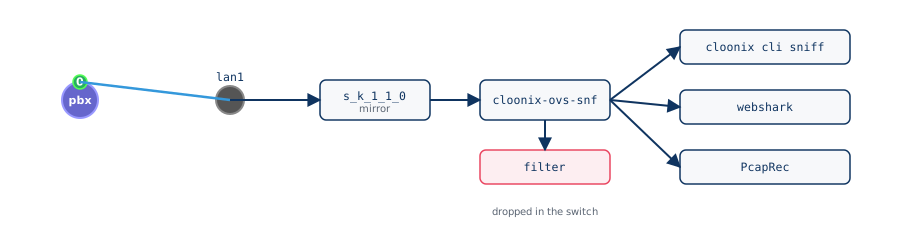
An interface, or an air, is sniffed:
cloonix cli nemo sniff pbx eth0
cloonix cli nemo sniff pbx eth0 udp port 5060
cloonix cli nemo sniff pbx eth0 --bytes icmp or arp
cloonix cli nemo sniff pbx eth0 --line "tcp and not port 22"
A wlan is captured with its air, and a sniff of a wlan sniffs its air. One not capturable yet is made so first, and the client says it on stderr, the same as a cloonix cli nemo cnf pbx eth0 sniff=on before:
cloonix: pbx eth0 was not sniffed, done now: cnf pbx eth0 sniff=on
sniff subscribes and blocks, one line per packet, until ctrl-c. With a filter, what does not match is dropped inside the switch and never crosses the wire. Four shapes:
--dump    the raw pane of webshark, the default
--bytes   one line per packet, bytes separated by spaces
--line    one line per packet, hex end to end
--count   nothing decoded: every second, packets and Mbit/s received and
          packets dropped, a total at ctrl-c
The packet numbers are given by the server to every packet that passed the filter; a gap in them is packets the server dropped for this client because its connection was behind, 8 MB queued.
No. 23     Time 1785794120.183937 (+0.000000)   Length 522 of 522
0000   02 62 e7 bd 02 00 02 5e b6 4f 03 00 08 00 45 00   .b.....^.O....E.
Anything containing brackets, !, && or || must be quoted.
9.14.1. Capture filters
A subset of the tcpdump capture grammar, applied to bytes as they arrive:
ip  ip6  arp                  ethertype
tcp  udp                      over ipv4 or ipv6
icmp  icmp6                   ipv4 only, ipv6 only
host 10.0.0.1                 either end; also the arp for that address
src host   dst host           one end
net 10.1.0.0/16               either end inside; src net, dst net
port 5060                     either port, tcp or udp; src port, dst port
portrange 5060-5070           src portrange, dst portrange
less 100   greater 300        frame length, headers included
and  or  not  ( )             && || ! accepted
Two terms side by side mean and; and binds tighter than or; a
protocol word qualifies the term after it, so not udp portrange
10000-10100 is not (udp and portrange ...). Addresses are ipv4 only. A
fragment other than the first matches no port term. Not there: byte
offsets, vlan, mpls, ether host, ipv6 addresses, anything stateful.
On an air the filter reads ethernet only and passes every 802.11 frame;
the display filters of webshark select the frames of an air.
udp port 5060 sip signalling, no rtp
icmp or arp an idle lan
tcp and not port 22 everything but your ssh
host 10.0.0.1 and not icmp one machine, without the pings
(tcp or udp) and dst host 10.0.0.2 anything addressed to one machine
not udp portrange 10000-10100 everything except an rtp flood
ip and not udp and not tcp ospf, esp, vrrp: protocols without a port
A wrong filter is refused with the reason:
refused by the cloonix server: bad filter: 'http' is not a port number
refused: bad filter: '33' is not a prefix length between 0 and 32
refused: bad filter: ')' does not belong there, an 'and' or 'or' may be missing
9.15. Playing a demo
cloonix cli nemo demo                              every demo, as area/name.py
cloonix cli nemo demo routing                      the demos of the area
cloonix cli nemo demo routing/frrmix.py        play it
cloonix cli nemo demo frrmix                       the short name resolves too
/usr/share/cloonix/demos/cloonix/c2c.py nemo fido mito   three nets: run the file itself
The demo runs on the machine you typed on and drives the server over the net. demo passes the net name and nothing else, so a demo that takes several, cloonix/c2c.py with its three nets, is run as a file. The demos chapter has each one.
9.16. When anything fails
One shape, whichever verb and whichever layer:
cloonix: cannot reach the cloonix server
  asked : add cnt c1 eth=1 trixie
  where : net mito -- the server at 127.0.0.1:45212
  reason: [Errno 111] Connection refused
  try   : cloonix start mito
  try   : cloonix list      to see which nets answer
Exit codes:
0    it worked
1    the request reached the server and did not succeed
2    it never got that far: usage, config, connection
3    the client itself broke; --raw shows the traceback
add, del, plug, unplug, cnf and save are answered by the server when done or when refused, and the client waits for that answer, the wait sized by the verb:
REFUSED by the cloonix server at 127.0.0.1:45211
  asked : add cnt trix1 eth=1 trixie
  reason: CNT ERROR trix1: no_vswitchd_for_net_nemo
  the container was refused by suid_power; the lines before its refusal are in the server log:
    bundle: sudo journalctl -b | grep -i "suid\|crun"
    toy:    ./<net>cmd shell, then grep -i "suid\|crun" /var/log/syslog

NO ANSWER from the cloonix server at 127.0.0.1:45211 after 59.6s (waited up to 60s)
  asked : add cnt trix1 eth=1 trixie
  This verb is answered when it has worked and when it has failed,
  so neither happened in that time.
  What the server has now:
    cloonix cli <net> dump commands
  The server side:
    bundle: sudo journalctl -b | grep -i "cloonix\|suid\|crun"
    toy:    ./<net>cmd shell, then grep -i "cloonix\|suid\|crun" /var/log/syslog
  ...
    cloonix --wait 240 cli ...
Silence is never read as success. --wait <s> overrides the wait and means the caller has chosen: a wait that expires then reports nothing and does not fail.
The ok of add kvm and add cnt says the machine runs; the agent inside it answers ssh a few seconds later, and a script waits for that with a first ssh that is allowed to fail, as every demo does.
9.17. Tab completion
Nothing is installed in any shell and no directory of the machine is touched. The hook is printed by the client and evalled by whoever wants it, in a bash or a zsh:
eval "$(cloonix --completion)"
Put that line in ~/.bashrc. Then:
cloonix <TAB>                       list start stop cli
cloonix cli <TAB>                   the nets of cloonix.cfg that answer
cloonix start <TAB>                 the nets that do not
cloonix stop <TAB>                  the nets that answer
cloonix cli nemo <TAB>              the fourteen verbs of cli
cloonix cli nemo add <TAB>          kvm win freebsd cisco cnt tap nat a2b c2c phy
cloonix cli nemo cnf cnt1 <TAB>     eth0 cpu=50 ram=200 x=300, what fits a cnt
cloonix cli nemo dump <TAB>         config topo json drawing commands pid images ip namespaces ovs-vsctl
cloonix cli nemo ssh <TAB>          the guests of the running net
cloonix cli nemo demo <TAB>         the areas, then the demos of one
Where nothing can be completed, a name to invent, a number, an image, tab prints the syntax of the place and fills a typical example:
~$ cloonix cli nemo add cnt <TAB>
cloonix cli nemo add cnt <name> [eth=N] [--persistent] [startup_env=VAR=val] [vmount=spec] [wlan=N] [mac_addr=ethN:xx:xx:xx:xx:xx:xx] <directory>   e.g. cnt1
so cli nemo add cnt and three tabs give cli nemo add cnt cnt1 eth=1 trixie. The example is not a fact: nothing on the client side knows which images the server has, and a wrong one is refused at execution.
The completion reads nothing from the machine it runs on: the words come from its own tables or from the server, so a client on a laptop offers what a client on the server does. The one exception is the demo list, read from the disk the client plays from. The nets and the guests are asked under 0.70 s; a net that never answers is not offered by cli and stop, and is offered by start.
The client writes nothing on the machine: no history file, no config file of its own, nothing handed to the shell history. A command ends on its own report. For the syntax line on a single tab, in ~/.inputrc:
set show-all-if-ambiguous on
9.18. Any operating system
The client and its helpers copied to a windows or a macos machine reach a cloonix running elsewhere over 45211, with cloonix_config.py beside them or -s host:port:passwd. On windows, raw keystrokes come through the console api: use the windows console or windows terminal, not the mintty of git bash, which gives line mode. scp -r pulling a tree with symlinks needs developer mode.
win_client/ makes an installer for one user, no administrator:
./win_client/make_win_zip.sh writes /tmp/cloonix-client-win-101.zip
Extract the zip on windows and run install.bat: it finds the newest python 3.7 or later, writes cloonix.cmd, sets the PATH and CLOONIX_CLIENT, which lets a demo start the client as <interpreter> <file> since CreateProcess finds no .cmd by bare name. uninstall.cmd, or Settings, Apps, Cloonix client, takes it back. Every demo runs there except cisco, which drives serial consoles through a pty.
User documentation ‹ 8. Cloonix toy › 10. Two panes: cloonix cli files