User documentation ‹ 21. Instructions for building › 14. The open sources cloonix is built on
1. Learning with cloonix
This chapter is a course through the demos: twelve packages, each a few demos on one subject, ordered so that every package uses only what the packages before it showed. The chapters after this one are the reference of each demo, area by area; this chapter is the order, what to look at, and what to try.
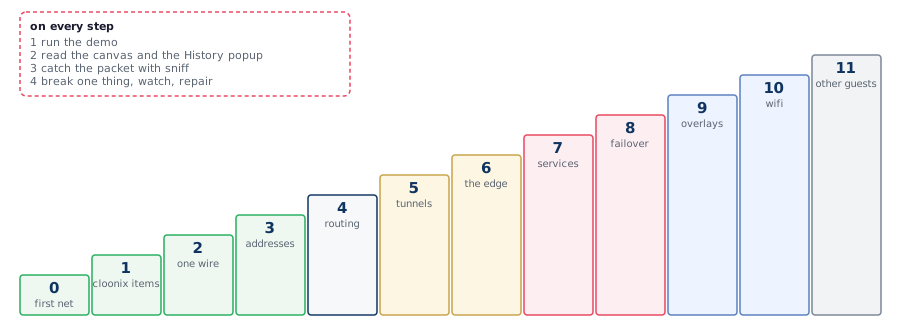
A topology is a few lines of python, starts in seconds and touches nothing on the host. Every demo begins with del all and ends with its network running, so a package can be repeated, stopped half way, or left for the next day.
1.1. Before package 0
One server, started once, and the canvas open beside the terminal:
cloonix start nemo
https://127.0.0.1:4444      user nemo, password nemoclown
A demo that lacks its image stops at its first line and prints the script that builds it, in vm_create/cnt_kvm_demo, and the download on clownix.net. The images of all the packages:
cd vm_create/cnt_kvm_demo
./doitall.sh --all
1.2. How a step goes

The same four moves in every package:
Run. Paste the demo line. The terminal shows the cloonix commands, each one ready to be pasted again by hand.
Read. On the canvas the items appear at the places of the figure. From the Demo panel, the History popup tells each act and what it proved; its About view holds the drawing and the docstring.
Catch. Put a sniffer on the interface named in the package. The filter runs in the switch; its grammar is a subset of tcpdump's: ip ip6 arp tcp udp icmp icmp6 host net port portrange less greater and or not ( ). A protocol with no port is reached by exclusion:
cloonix cli nemo cnf gwA eth1 sniff=on
cloonix cli nemo sniff gwA eth1 --dump udp port 51820
cloonix cli nemo sniff cod1 eth0 --dump "ip and not udp and not tcp"
A double-click on a green interface of the canvas opens the same capture in webshark, dissected.
Break. The network is still running. Take a link down from a shell (double-click on the machine), watch the capture, put it back:
cloonix cli nemo ssh dns1 "ip link set eth1 down"
cloonix cli nemo ssh dns1 "ip link set eth1 up"
A lan is an openvswitch bridge, a kvm has its own kernel, a cnt has a kernel network stack of its own, the routing daemon is frr. A configuration that works here works on hardware, and one that fails here fails there for the same reason.
2. Package 0 -- The first network
Two machines, one lan, one ping: the smallest network, as containers then as virtual machines. The chapter The first network prints the run line by line.

Needs: image trixie for cnt.py, trixie.qcow2 for kvm.py.
The demos, in this order:
cloonix cli nemo demo cloonix/cnt.py         two containers, one lan, one ping
cloonix cli nemo demo cloonix/kvm.py         the same with two virtual machines
Steps
Run cnt.py. Nine commands are printed: two add cnt, two plug, four ssh setting addresses, one ping.
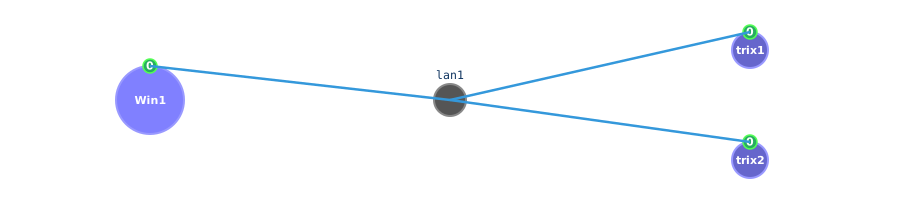
On the canvas: two circles, one lan between them, interface 0 of each as a green dot.
Double-click cnt1: a root shell opens in a panel. Type ip addr: eth0 carries 1.1.1.1/24.
Run kvm.py. The circles are larger, the wait before the first ssh is a kernel boot.
Type the nine lines by hand, from the chapter First run, with other names and addresses.
The packet:
cloonix cli nemo cnf cnt1 eth0 sniff=on
cloonix cli nemo sniff cnt1 eth0 --dump icmp
cloonix cli nemo ssh cnt2 "ping -c 3 1.1.1.1"
Break and repair: cloonix cli nemo unplug cnt2 eth0 lan1: the ping stops, the sniffer on cnt1 goes silent. plug cnt2 eth0 lan1 restores it.
Known after this package: add cnt, add kvm, plug, ssh, sniff, del all; a lan exists from its first cable; ssh reaches a guest without any address in it.
3. Package 1 -- The cloonix items
The objects cloonix provides, used by every package after this one: a shaped cable, the capture, the way out to the internet, a cable to another cloonix, a published port, a mounted directory, caps on a container, a container booting systemd, two radios on an air.

Needs: wg_trixie or proxy_trixie for a2b and snf, nft_trixie for nat, trixie and three nets of cloonix.cfg for c2c, proxy_trixie for nginx; on the host sudo modprobe mac80211_hwsim radios=0 for wifi; see the head of the other demos.
The demos, in this order:
cloonix cli nemo demo cloonix/a2b.py         one wire, given loss, delay and a rate
cloonix cli nemo demo cloonix/snf.py         four filters, four counts, one interface
cloonix cli nemo demo cloonix/nat.py         a guest reaching the internet through the host
/usr/share/cloonix/demos/cloonix/c2c.py nemo fido mito
cloonix cli nemo demo cloonix/nginx.py       a kvm and a container serving the same page
cloonix cli nemo demo cloonix/mount.py       a host directory inside a guest
cloonix cli nemo demo cloonix/limit.py       a container capped in cpu and ram
cloonix cli nemo demo cloonix/systemd.py     a container booting systemd
cloonix cli nemo demo cloonix/cntwifi.py      two containers, one radio each, a ping over the air cntwifi
cloonix cli nemo demo cloonix/kvmwifi.py      two kvm, one radio each, a ping over the air kvmwifi
cloonix cli nemo demo cloonix/cntkvmwifi.py   a container and a kvm, one radio each, a ping over the air cntwifi
Steps
Run a2b.py. The ping times printed in the History popup change with each cnf <a2b> A2B line.
The a2b panel of the canvas holds the same loss, delay and rate as sliders, per direction.
Run snf.py: four subscriptions on one interface, each with its filter and its count.
Run nat.py: the guest gets its address by DHCP from the nat item and pings a name of the internet.
Run c2c.py with three net names: it builds three nets and one ping crosses them. Open the canvas of each net.
Run nginx.py: it stops and waits for Enter, the published port being open in the browser of the host meanwhile.
Run mount.py and limit.py: vmount=, startup_env=, cnf cpu= ram=.
Run cntwifi.py, with sudo modprobe mac80211_hwsim radios=0 on the host: two radios on the air cntwifi, one ad hoc network, one ping.
Run kvmwifi.py: two kvm radios on the air kvmwifi, made by the agent inside each guest, nothing loaded on the host; one ad hoc network, one ping.
Run cntkvmwifi.py, with mac80211_hwsim loaded on the host: the kvm radio put on cntwifi with plug k1 wlan0 cntwifi, one ad hoc network with the container, a ping both ways.
The packet:
cloonix cli nemo sniff hostA eth0 --dump icmp
cloonix cli nemo sniff gw eth1 --dump udp port 67
cloonix cli nemo sniff Cnt1 eth0 --dump tcp port 80
Break and repair: in nat, unplug on the nat item: the guest keeps its address and loses the internet.
Known after this package: what a link does to traffic, a filter running in the switch, the way out, a cable between two cloonix servers over udp, the way in, the mounts and the caps.
4. Package 2 -- One wire, and what rides it
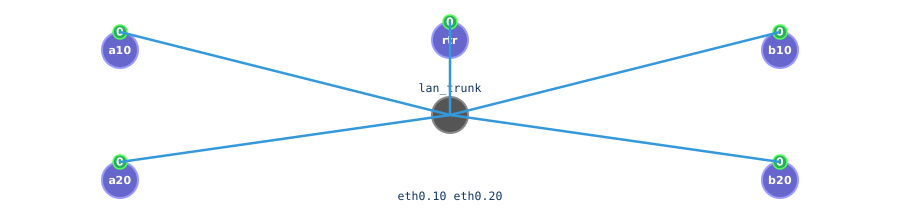
Below IP: a cable carrying two separate networks, a loop of switches.
Needs: trixie.
The demos, in this order:
cloonix cli nemo demo switching/vlan.py      one trunk, two 802.1Q tags, two networks
cloonix cli nemo demo switching/stp.py       three bridges in a loop, one port blocked
Steps
Run vlan.py. a10 reaches the machines of tag 10 and none of tag 20, on the same trunk lan.
Run stp.py. One bridge port is in blocking state; the demo prints which.
The packet:
cloonix cli nemo sniff a10 eth0 --dump
cloonix cli nemo sniff br1 eth0 --dump
Break and repair: in stp, take down the link that is forwarding; the blocked port changes state after the timers of the protocol, and the ping resumes.
Known after this package: how a tag separates two networks on one wire, why a loop needs a protocol.
5. Package 3 -- Addresses, names, time
What a host needs before anything else: an address, a resolver, a clock.
Needs: dhcp_trixie, frr_trixie, dns_trixie, unbound_trixie, knot_trixie, ntp_trixie.
The demos, in this order:
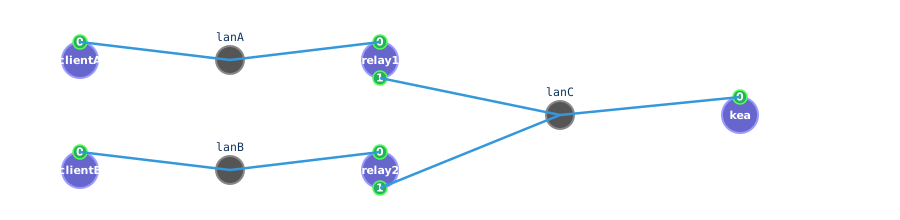
cloonix cli nemo demo address/dhcp.py        an address handed out across a relay
cloonix cli nemo demo address/ipv6.py        an address nobody configured: SLAAC
cloonix cli nemo demo address/dns.py         a name resolved once routing is up
cloonix cli nemo demo address/unbound.py     a caching resolver
cloonix cli nemo demo address/knot.py        an authoritative server and a zone transfer
cloonix cli nemo demo address/ntp.py         a client disciplining its clock
Steps
Run dhcp.py. The client is two lans away from the server; the relay r1 carries the request.
Run ipv6.py. No server this time: each host makes its address from the prefix r1 advertises and from its own mac.
Run dns.py, then unbound.py and knot.py as a pair: the resolver a client asks, and the server that holds the zone.
Run ntp.py. The offset printed by the client decreases between two readings.
The packet:
cloonix cli nemo sniff r1 eth0 --dump udp port 67 or udp port 68
cloonix cli nemo sniff r1 eth0 --dump icmp6
cloonix cli nemo sniff ns eth0 --dump udp port 53
cloonix cli nemo sniff kp eth0 --dump tcp port 53
cloonix cli nemo sniff ntps eth0 --dump udp port 123
Break and repair: in dhcp, take down the interface of r1 toward the server and ask for a lease again from the client: the DISCOVER is on r1 0, nothing leaves by r1 1.
Known after this package: DHCP is a broadcast that needs a relay to cross a router; an IPv6 host makes its own address from a router advertisement, icmp6 replacing arp; DNS is udp 53 and a zone transfer is tcp 53; NTP is udp 123.
6. Package 4 -- Routing
A packet reaching a machine that is not on the same wire. Each demo adds one idea to the one before; the last one routes below IP, ethernet frames forwarded by batman-adv in the kernel.
Needs: frr_trixie, bird_trixie, babel_trixie, batman_trixie; for batman, on the host, once per boot, sudo modprobe batman-adv. The demo says so when the module is missing.
The demos, in this order:
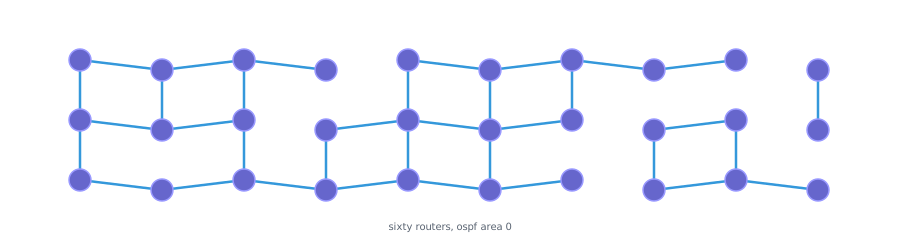
cloonix cli nemo demo routing/frrspider.py      sixty routers, OSPF
cloonix cli nemo demo routing/frrspider_bgp.py  the same sixty, BGP
cloonix cli nemo demo routing/frrmix.py         OSPF inside a site, BGP between sites
cloonix cli nemo demo routing/bird.py           OSPF with another daemon
cloonix cli nemo demo routing/isis.py           the link-state protocol of the carriers
cloonix cli nemo demo routing/babel.py          a distance-vector protocol that reroutes
cloonix cli nemo demo routing/batman.py         four nodes in a chain, one interface bat0
Steps
Run frrspider.py. The canvas draws the web; the History popup gives the time taken for every router to hold every route.
Open a shell on cod1 and type vtysh -c "show ip route": the table computed by frr.
Run frrmix.py: two protocols, and the redistribution between them.
Run bird.py after frrspider.py: the same OSPF packets from a different program.
Run isis.py: the same idea as OSPF, in frames with no IP header; the direct side of the triangle is cut and the traffic goes round.
Run batman.py. No node is cabled to more than two others; over bat0 every node pings every other.
In a shell on n2: batctl n lists the neighbours, batctl o the originators.
The packet:
cloonix cli nemo sniff cod1 eth0 --dump "ip and not udp and not tcp"
cloonix cli nemo sniff b11 eth0 --dump tcp port 179
cloonix cli nemo sniff r1 eth1 --dump udp port 6696
cloonix cli nemo sniff r1 eth2 --dump "not ip and not ip6 and not arp"
cloonix cli nemo sniff n2 eth0 --dump
Break and repair: in babel, take down one link of the path in use; the route changes to the other path, and returns when the link is back.
Known after this package: OSPF is ip protocol 89, BGP is tcp 179, babel is udp 6696, IS-IS has no IP header; a routing table is the result of a protocol, not a configuration; routing exists below IP as well, ethertype 0x4305 carries it, with no IP header for the filter to match.
7. Package 5 -- Encryption and tunnels
One connection encrypted end to end, then four tunnels: ways to cross a wire that must not read the traffic.

Needs: openvpn_trixie for tls, wg_trixie, openvpn_trixie, tinc_trixie, strongswan_trixie; for openvpn and tinc, on the host, sudo modprobe tun.
The demos, in this order:
cloonix cli nemo demo security/tls.py        one page over http, then over https
cloonix cli nemo demo security/wg.py         WireGuard: a peer is a key and a list of addresses
cloonix cli nemo demo security/openvpn.py    a point-to-point tunnel with a shared key
cloonix cli nemo demo security/tinc.py       a mesh vpn whose nodes exchange keys
cloonix cli nemo demo security/ipsec.py      strongSwan on one end, Libreswan on the other
Steps
Run tls.py. The string of the page is in the bytes of port 8080 and not in those of port 8443; trusting another certificate the client refuses the server.
Run wg.py. Act 1 fetches a page with no tunnel: the request is readable on the middle lan. Act 3 repeats the fetch through the tunnel.
Keep two sniffers running on gwA 1, one on tcp port 80 and one on udp port 51820, across the acts.
Run ipsec.py: two independent implementations negotiate, IPsec being a standard.
The packet:
cloonix cli nemo sniff web eth0 --dump tcp port 8443
cloonix cli nemo sniff gwA eth1 --dump tcp port 80
cloonix cli nemo sniff gwA eth1 --dump udp port 51820
cloonix cli nemo sniff gwA eth0 --dump "ip and not tcp and not udp and not icmp"
Break and repair: in wg, remove the peer on one gateway (wg set wg0 peer <key> remove): the fetch fails and udp 51820 stops.
Known after this package: TLS encrypts one connection and the certificate says who answers; what an eavesdropper sees before and after a tunnel; ESP is ip protocol 50, WireGuard is udp.
8. Package 6 -- The edge
Filtering, inspecting, authenticating, and the layer 2 attack the edge has to watch for.
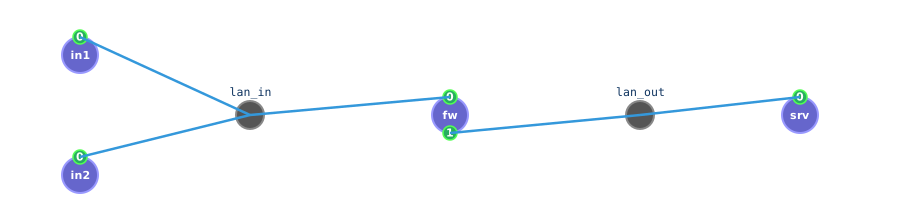
Needs: nft_trixie, suricata_trixie, ebpf_trixie, radius_trixie, arp_trixie. ebpf.py needs the net started by root: loading an XDP program is not granted to a container of a user.
The demos, in this order:
cloonix cli nemo demo security/nftables.py   a stateful firewall: filter, masquerade, dnat
cloonix cli nemo demo security/suricata.py   a sensor naming the traffic it sees
cloonix cli nemo demo security/ebpf.py       a program in the kernel dropping packets
cloonix cli nemo demo security/radius.py     the right password accepted, the wrong one rejected
cloonix cli nemo demo security/arp.py        arp poisoning, a machine put in the middle
Steps
Run nftables.py first. Compare the two sides of fw: the source address differs after the masquerade.
Run suricata.py: the alert names the rule that matched.
Run ebpf.py: the request is seen arriving on h2, no reply leaves.
Run arp.py: the victim's entry for the gateway moves to the attacker's mac, then a static entry pins it back.
The packet:
cloonix cli nemo sniff fw eth0 --dump tcp port 80
cloonix cli nemo sniff fw eth1 --dump tcp port 80
cloonix cli nemo sniff h2 eth0 --dump icmp
cloonix cli nemo sniff victim eth0 --dump arp
Break and repair: in nftables, flush the connection tracking (conntrack -F) during a transfer: the established flow stops.
Known after this package: a stateful filter keeps a table; NAT rewrites addresses at one point; XDP acts before the kernel stack; arp trusts any answer, and pinning or switch inspection is the defence.
9. Package 7 -- Services
What clients connect to, once the network works.
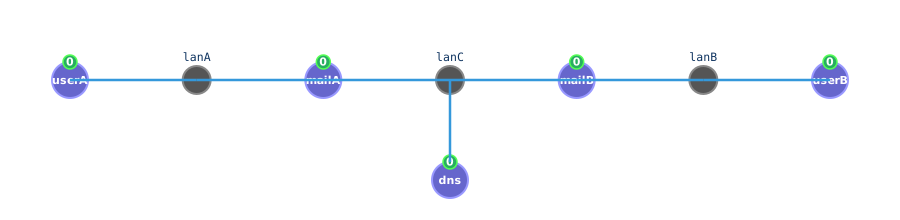
Needs: proxy_trixie, squid_trixie, smtp_trixie, mqtt_trixie, asterisk_alpine.
The demos, in this order:
cloonix cli nemo demo services/proxy.py      one request, two connections, a health check
cloonix cli nemo demo services/squid.py      a caching proxy: a hit, and a refused destination
cloonix cli nemo demo services/smtp.py       mail relayed from server to server
cloonix cli nemo demo services/mqtt.py       a publish and subscribe broker
cloonix cli nemo demo services/asterisk.py   a call set up, carried, released
Steps
Run squid.py: the second fetch of the same page is a cache hit, the forbidden name gets a 403.
Run smtp.py: the MX lookup precedes the tcp 25 connection, both on the same interface.
Run asterisk.py: SIP sets the call up, RTP carries it.
The packet:
cloonix cli nemo sniff px eth0 --dump tcp port 3128
cloonix cli nemo sniff mailA eth1 --dump udp port 53 or tcp port 25
Break and repair: in smtp, stop the DNS server: the mail stays in the queue of mailA, and leaves when the server is back.
Known after this package: a proxy is the one address its clients talk to; mail routing depends on DNS; signalling and media are two flows.
10. Package 8 -- Staying up
A service surviving the loss of its machine.
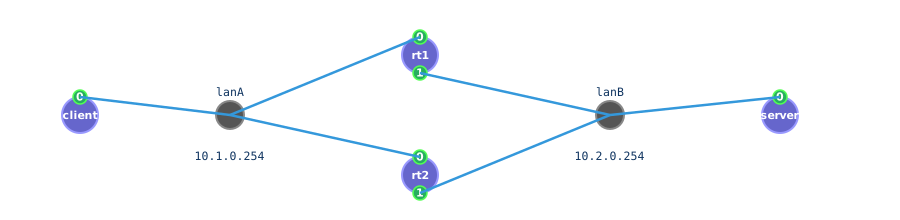
Needs: vrrp_trixie, cluster_trixie.
The demos, in this order:
cloonix cli nemo demo availability/vrrp.py     a gateway address moving to a standby
cloonix cli nemo demo availability/cluster.py  Corosync membership, Pacemaker moving a service
Steps
Run vrrp.py with a ping running from client: the demo stops the master, the ping loses a few packets and resumes.
Run cluster.py: the service address appears on the other node.
The packet:
cloonix cli nemo sniff client eth0 --dump arp
cloonix cli nemo sniff nodeA eth0 --dump udp port 5405
Break and repair: in cluster, put the active node in standby (crm node standby): the address moves; online brings the node back.
Known after this package: a virtual address is announced by a gratuitous ARP; a cluster agrees on membership before moving anything.
11. Package 9 -- Overlays and the real network
A layer 2 network carried over a routed core, one logical network over several hosts, a real interface of the host taken into a net, and where the throughput goes.
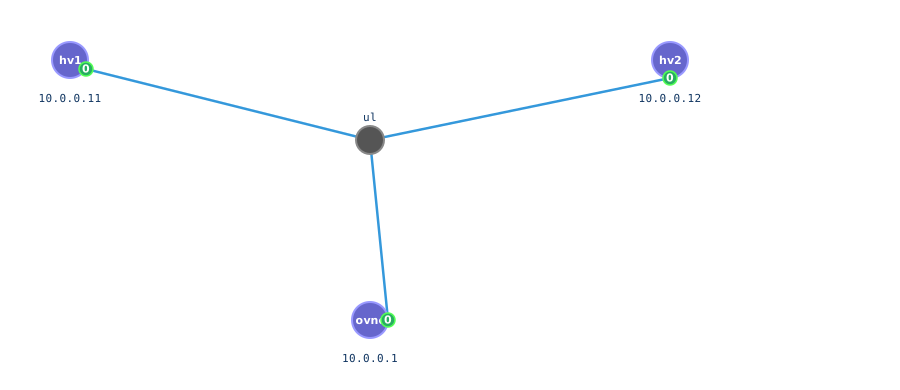
Needs: frr_trixie and, on the host, sudo modprobe vxlan; ovn_trixie and, on the host, sudo modprobe openvswitch; python_trixie.qcow2 for phy and realnet; perf_trixie for perf.
The demos, in this order:
cloonix cli nemo demo switching/vxlan.py     one lan over a routed core, frames in udp 4789
cloonix cli nemo demo switching/ovn.py       one logical switch over two hosts, Geneve
cloonix cli nemo demo cloonix/phy.py         a real interface taken in: macvlan and absorb
cloonix cli nemo demo cloonix/realnet.py     a guest on the real network
cloonix cli nemo demo watching/perf.py       where the throughput goes
Steps
Run vxlan.py: two hosts share a subnet the core does not carry; their frames cross it wrapped in udp 4789.
Run ovn.py. The ping of the tenant is inside udp 6081 on the underlay.
Run phy.py: two kvm each run a cloonix of their own, one on a macvlan of its eth0, the other on its absorbed eth0.
Run realnet.py: a container of a nested cloonix holds an address of the lan of its kvm.
The packet:
cloonix cli nemo sniff vtep1 eth1 --dump udp port 4789
cloonix cli nemo sniff hv1 eth0 --dump udp port 6081
Break and repair: in ovn, take down the underlay interface of one hypervisor: the overlay stops with it.
Known after this package: an overlay wraps a frame in udp so a routed core carries a layer 2 network (vxlan 4789, geneve 6081); a real interface enters a net as a macvlan or whole.
12. Package 10 -- Wifi
Radios and airs. A container or a kvm gets radios with wlan=N; each is a wlan of the guest, on an air, the lan of the wlans, which cloonix carries and captures by its name. Every demo of the package is played twice: by containers, whose radios start on the air cntwifi, then by kvm, whose radios start on the air kvmwifi.

Needs: for the containers, on the host sudo modprobe mac80211_hwsim radios=0 and trixie; for the kvm, trixie.qcow2 and nothing on the host.
The demos, in this order:
cloonix cli nemo demo wifi/cnt_wpa2.py        containers: an access point, two stations, WPA2, a station moved to another air
cloonix cli nemo demo wifi/cnt_open.py        containers: an open network, every frame readable on the air
cloonix cli nemo demo wifi/cnt_wpa3.py        containers: SAE, then only encrypted data on the air
cloonix cli nemo demo wifi/cnt_bridge.py      containers: an access point bridging the air to a cable
cloonix cli nemo demo wifi/cnt_roaming.py     containers: one SSID, two cells, a station moving between them
cloonix cli nemo demo wifi/cnt_mesh.py        containers: three radios in an 802.11s mesh, no access point
cloonix cli nemo demo wifi/kvm_wpa2.py        kvm: an access point, two stations, WPA2, a station moved to another air
cloonix cli nemo demo wifi/kvm_open.py        kvm: an open network, every frame readable on the air
cloonix cli nemo demo wifi/kvm_wpa3.py        kvm: SAE, then only encrypted data on the air
cloonix cli nemo demo wifi/kvm_bridge.py      kvm: an access point bridging the air to a cable
cloonix cli nemo demo wifi/kvm_roaming.py     kvm: one SSID, two cells, a station moving between them
cloonix cli nemo demo wifi/kvm_mesh.py        kvm: three radios in an 802.11s mesh, no access point
cloonix cli nemo demo wifi/cntkvm_home.py     cnt and kvm: a home box, the addresses given over the air
cloonix cli nemo demo wifi/cntkvm_enterprise.py  cnt and kvm: WPA2-Enterprise, a login per user, RADIUS
cloonix cli nemo demo wifi/cntkvm_roaming.py  cnt and kvm: a station roaming from a cnt AP to a kvm AP
cloonix cli nemo demo wifi/cntkvm_monitor.py  cnt and kvm: a listener in monitor mode, open then WPA2
Steps
Run wifi/cnt_wpa2.py: three radios on the air cntwifi, WPA2, then sta2 put on air2 loses the access point and finds it again back on cntwifi.
Run wifi/cnt_open.py, then double-click the air cntwifi for its webshark: the ping is decoded under the 802.11 header.
Run wifi/cnt_wpa3.py: SAE commit and confirm, the 4-way handshake, then only encrypted data.
Run wifi/cnt_bridge.py: the ping of the station counted on the cable of the server.
Run wifi/cnt_roaming.py: the station moved to cell2 joins ap2 with the same address.
Run wifi/cnt_mesh.py: three mesh points peer, no access point.
Run the six wifi/kvm_ demos: the same acts and the same results with kvm, the air being kvmwifi.
Run the four wifi/cntkvm_ demos: containers and kvm on one air, in the roles of a home box, an enterprise network, two access points and a listener.
The packet:
cloonix cli nemo cnf cntwifi sniff=on
cloonix cli nemo sniff cntwifi
cloonix cli nemo cnf kvmwifi sniff=on
cloonix cli nemo sniff kvmwifi
cloonix cli nemo plug sta wlan0 cell2
Break and repair: in roaming, put sta back on cell1: it returns to ap1.
Known after this package: a wlan of a container or of a kvm is plugged into an air as an eth into a lan; an open air is readable, a WPA2 or WPA3 air shows only lengths; an access point bridges the air to a cable.
13. Package 11 -- Other guests
Guests that are not linux.
Needs: a disk image built or fetched first; each demo prints how when the image is missing.
The demos, in this order:
cloonix cli nemo demo freebsd.py             a BSD guest carrying the cloonix agent
cloonix cli nemo demo windows.py             a windows guest, virtio drivers from the added disc
cloonix cli nemo demo cisco.py               a cisco router driven through its serial console
Steps
Run freebsd.py: ssh works as in a linux guest, the agent being on a disc of its own.
Run windows.py, then right-click the kvm, Desktop: noVNC opens in a panel.
Run cisco.py: the configuration is typed by the demo on the serial console.
The packet:
cloonix cli nemo cnf cisco1 eth1 sniff=on
cloonix cli nemo sniff cisco1 eth1 --dump "ip and not udp and not tcp"
Break and repair: none: these demos end the course.
Known after this package: a guest needs an agent for ssh and scp; without one it is reached by its console or its desktop.
13.1. What is not here
Cloonix emulates a network, not hardware: no line rate, no ASIC, no optics. An a2b shapes a cable; it is not a channel model. The radios of wifi/cnt_wpa2.py are mac80211_hwsim: association and EAPOL are real, the propagation is not: an air is a lan of wlans, captured by its name.
13.2. Writing your own
A demo is a python programme using the standard library, taking the net name as its only argument, and driving the server as the client does:
#!/usr/bin/env python3
run("cloonix cli %s add cnt cnt1 eth=1 trixie" % NET)
wait("cnt1")
ssh("cnt1", "ip addr add 1.1.1.1/24 dev eth0")
The shortest way in: build the topology on the canvas, Commands in the Demo window, and put the lines it prints in a python programme. The chapter Writing a demo of the developer book has the house rules: the docstring, the ascii art, the packet to catch, the erase and the placing at the start, every command printed as typed, and the two checkers:
debug/check_demos.py            static, no server
debug/demo_test.py nemo         runs every demo and reports
User documentation ‹ 21. Instructions for building › 14. The open sources cloonix is built on