User documentation ‹ 14. The open sources cloonix is built on › 16. Switching: vlans, spanning tree, overlays
15. Wifi: from the radio to the ip stack
A cable carries frames between two ports and nobody else hears them. A radio carries frames to every radio in range, and before the first ip packet a station and an access point exchange a dozen frames that no ethernet has: the network announces itself, the station asks to join, keys are agreed. This chapter is that part of networking, frame by frame. How cloonix carries the air is in the chapter on the items, section air.
15.1. The air, a shared medium
IEEE 802.11 was published in 1997: a lan with no cable. The frames go by radio in the 2.4 GHz band, later also 5 GHz and 6 GHz, on channels 20 MHz wide; in 2.4 GHz the channels are 5 MHz apart, so only 1, 6 and 11 do not overlap. Every radio on a channel hears every frame sent on it.
Two radios cannot talk at once on one channel. Before sending, a radio listens; if the channel is busy it waits a random time (CSMA/CA, collision avoidance, where ethernet on a hub did collision detection). A unicast frame is answered by an ACK frame from the receiver; with no ACK the sender sends again, the frame marked retry.
In cloonix the air replaces the channel. An air is the lan of the radios: a frame sent by a radio reaches the radios on the same air, and only them.
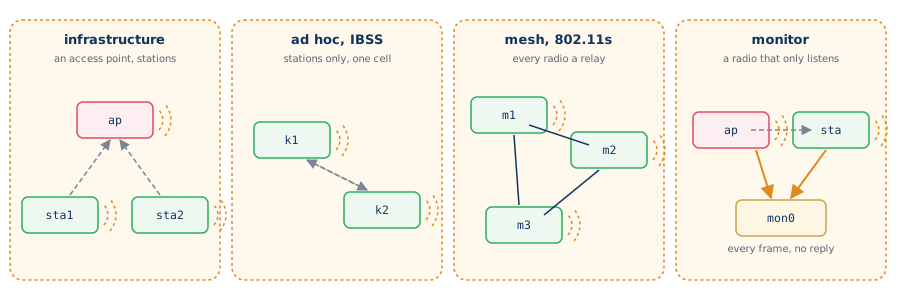
Four ways to use the air, all in the demos:
mode |
who talks to whom |
demo |
|---|---|---|
infrastructure |
stations through an access point |
wifi/cnt_open.py |
ad hoc (IBSS) |
stations directly, one cell, no AP |
cloonix/kvmwifi.py |
mesh (802.11s) |
every radio relays for the others |
wifi/cnt_mesh.py |
monitor |
a radio that listens and never answers |
wifi/cntkvm_monitor.py |
The names of an infrastructure network:
the SSID, the name of the network, up to 32 bytes, the one a phone shows;
the BSS, one access point and its stations; its BSSID is the mac address of the radio of the access point;
the ESS, several access points with one SSID: a station moves from one to the other and keeps its address (wifi/cnt_roaming.py).
15.2. The 802.11 frame
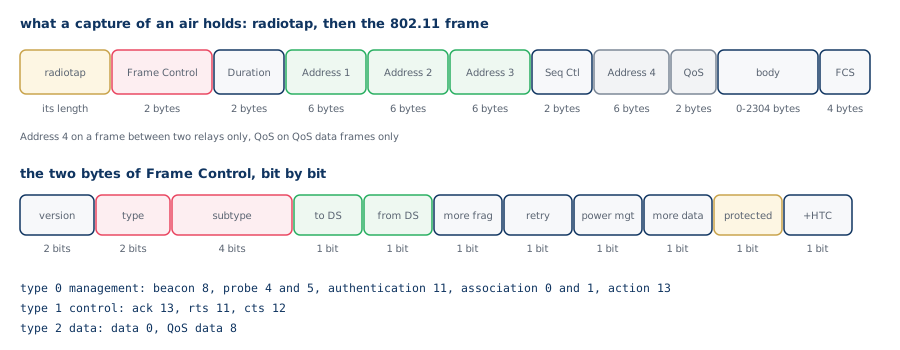
An ethernet header is 14 bytes: two addresses and a type. An 802.11 header is 24 to 36 bytes, and its first two bytes, Frame Control, say what the frame is:
type 0, management: the frames that build the network, beacons, probes, authentication, association;
type 1, control: the frames that share the air, ACK, RTS, CTS;
type 2, data: the frames that carry the ip packets.
The subtype gives the frame inside its type. In the capture filters of webshark the two are read together as wlan.fc.type_subtype.
A capture of an air starts each frame with a radiotap header: the rate, the channel and the signal the radio saw. It is not sent on the air; the capturing side adds it. In cloonix it is written by cloonix-suid-power, the process that carries the frames of every air.
15.3. Four addresses
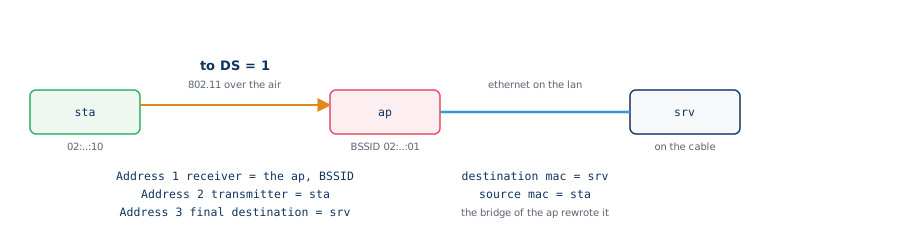
On a cable the sender and the destination are the two ends. On the air the radio that receives a frame is not always the machine it is for: a station sends everything to its access point, which forwards it. So an 802.11 frame has up to four addresses, and the bits to DS and from DS of Frame Control (DS, the distribution system: the wired side of the access points) give their roles:
to DS |
from DS |
Address 1 |
Address 2 |
Address 3 |
|---|---|---|---|---|
0 |
0 |
destination |
source |
BSSID |
1 |
0 |
BSSID (the AP) |
source |
destination |
0 |
1 |
destination |
BSSID (the AP) |
source |
1 |
1 |
receiver |
transmitter |
destination |
The last line is the one of a frame between two relays, a mesh or a wireless bridge; it has a fourth address, the original source. An access point bridging the air to a cable, wifi/cnt_bridge.py, turns a frame to DS into an ethernet frame with the destination and the source only.
15.4. Before the first ip packet
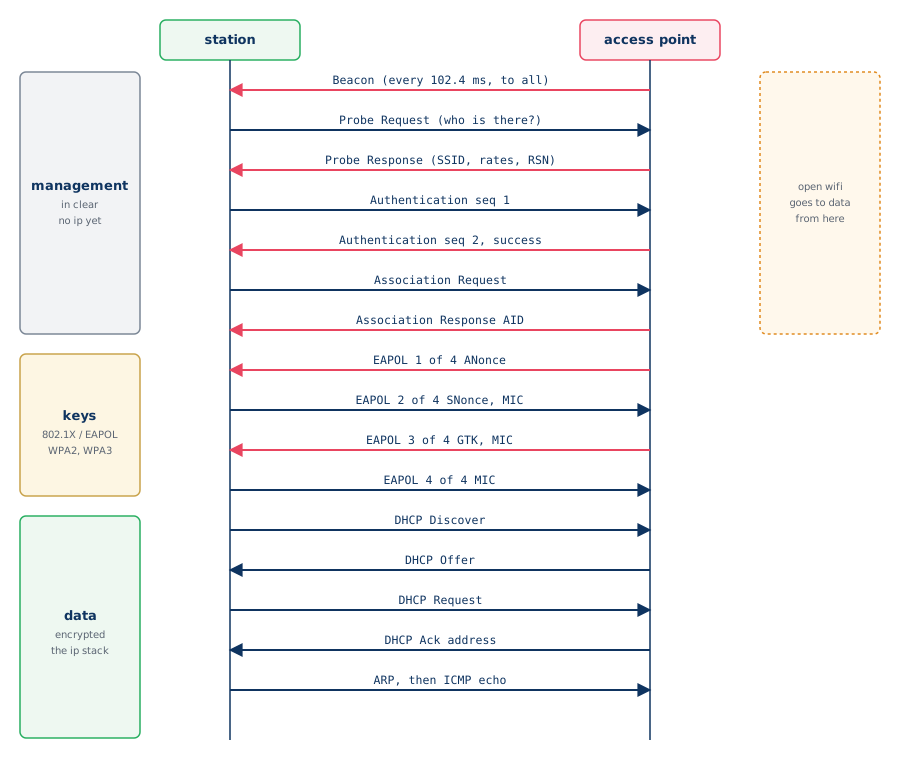
What wifi/cnt_wpa2.py shows on the air, in order.
Beacon. The access point sends one about ten times a second, every 100 TU (a time unit is 1024 microseconds, 102.4 ms). A beacon carries the SSID, the rates, the channel, and the RSN element, which lists the security offered: the cipher (CCMP, AES) and the way keys are made (PSK for a password, SAE for WPA3, 802.1X for a login). A station that only listens for beacons does a passive scan.
Probe Request, Probe Response. A station in a hurry asks: it sends a probe request, with an SSID or none, and every access point that matches answers with a probe response, a beacon addressed to it. This is an active scan.
Authentication. Two frames, sequence 1 and 2. For open system this exchange checks nothing; the name stays from 1997. WPA3 uses these two frames, each way, for SAE: commit and confirm, where the password is proved without being sent (wifi/cnt_wpa3.py).
Association Request, Association Response. The station asks to be part of the BSS; the access point answers with an association id (AID). On an open network the station can send data from here.
The 4-way handshake. Four EAPOL-Key frames make the keys:
both sides hold the PMK, the key of the network. With a password, WPA2-Personal, it is computed from the passphrase and the SSID (PBKDF2, 4096 rounds of SHA-1); with 802.1X it comes out of the login;
message 1 brings a random number of the access point, the ANonce;
message 2 brings the SNonce of the station and a MIC, a proof that the station knows the PMK;
both sides now compute the PTK, the key of this station, from the PMK, the two nonces and the two mac addresses: it is never sent;
message 3 brings the GTK, the key of the broadcast frames, encrypted, and a MIC; message 4 confirms.
Data. From here the data frames are protected: the protected bit of Frame Control is set, the body is encrypted with the PTK, and only the 802.11 header is readable. Then the ip stack starts as on a cable: DHCP asks for an address, ARP finds the gateway, a ping goes out. A DHCP server can be on the cable behind the access point: wifi/cntkvm_home.py.
Other frames of the same family:
Deauthentication, Disassociation: the end of the membership, sent by either side;
Action frames: the peering of a mesh, the management of a measurement or of a block of acknowledgements;
RTS and CTS: a short reservation of the air before a long frame.
WPA3 makes the management frames protected too (802.11w, PMF): a forged deauthentication is refused.
With WPA2-Enterprise there is no shared password: before the 4-way handshake the station and a RADIUS server hold an EAP conversation, carried on the air by EAPOL frames and on the cable by RADIUS, the access point relaying both ways without knowing the password. The PMK comes out of that login. wifi/cntkvm_enterprise.py has one user refused.
15.5. A mesh, an ad hoc cell
In 802.11s every radio is a mesh point. Mesh points send beacons with a Mesh ID in place of an SSID, peer with the ones they hear (the action frames Mesh Peering Open and Mesh Peering Confirm), and find their paths with HWMP, the routing of the standard: a frame may cross several radios, each using the four addresses. wifi/cnt_mesh.py has three mesh points.
An ad hoc cell, IBSS, has no access point either and no relay: every station must hear the others. Its first station starts the cell and sends the beacons with the others. cloonix/kvmwifi.py has two kvm in one.
15.6. Reading the air in webshark
The display filters of webshark, typed in its filter bar:
filter |
frames |
|---|---|
wlan.fc.type_subtype == 0x0008 |
beacons |
wlan.fc.type_subtype == 0x0004 |
probe requests |
wlan.fc.type_subtype == 0x0005 |
probe responses |
wlan.fc.type_subtype == 0x000b |
authentication, SAE included |
wlan.fc.type_subtype == 0x0000 |
association requests |
wlan.fc.type_subtype == 0x0001 |
association responses |
wlan.fc.type_subtype == 0x000c |
deauthentication |
eapol |
the 4-way handshake, EAP |
wlan.fc.type == 2 |
data frames |
wlan.fc.protected == 1 |
encrypted frames |
wlan.ssid == "cloonix" |
the frames naming this SSID |
wlan.addr == 02:00:00:00:00:10 |
the frames of one radio |
The button Data only of the webshark of an air keeps the data frames that carry a payload; Show all gives back the filter there was before. The chapter on the host system has the exact filter it applies. On an open network the ip of the data frames is readable; with WPA2 or WPA3 it is not, even for the medium: the capture of cloonix sees what a radio in monitor mode sees (wifi/cntkvm_monitor.py).
15.7. The wifi demos, in the order of this chapter
demo |
what to look at |
|---|---|
wifi/cnt_open.py |
beacons, probe, open authentication, clear data |
wifi/cnt_wpa2.py |
the four EAPOL messages, encrypted data |
wifi/cnt_wpa3.py |
SAE commit and confirm, protected management |
wifi/cntkvm_enterprise.py |
EAP over the air, RADIUS on the cable |
wifi/cnt_bridge.py |
a frame to DS becoming an ethernet frame |
wifi/cntkvm_home.py |
DHCP through the access point |
wifi/cnt_roaming.py |
one SSID, two access points, a station moving |
wifi/cnt_mesh.py |
mesh beacons, peering, relays |
wifi/cntkvm_monitor.py |
what a listening radio sees |
cloonix/kvmwifi.py |
an ad hoc cell of two kvm |
Each cnt_ demo has a kvm_ twin doing the same with kvm guests, and the cntkvm_ demos mix both on one air.
User documentation ‹ 14. The open sources cloonix is built on › 16. Switching: vlans, spanning tree, overlays