User documentation ‹ 12. The insider agent › 14. The demos of cloonix
13. The web canvas
The graphical interface is a web page served by cloonix itself: canvas 2d, websockets, xterm.js, noVNC, webshark. Nothing to install, nothing to forward:
https://127.0.0.1:4444             net nemo, from the machine running it
https://<ip>:4444                  from anywhere; user nemo, password nemoclown
The port number is the cloonix_web keyword of the net in cloonix.cfg; a net without it runs headless.
The web page asks for a user and a password. They are not secret, they are shipped in the configuration, and they can be changed there:
https://127.0.0.1:4444      user  nemo      password  nemoclown

the file, bundle      /usr/libexec/cloonix/cloonfs/etc/cloonix.cfg
the file, toy         <toy directory>/rootfs/cloonix/cloonfs/etc/cloonix.cfg
The user is the name of the net, the password its cloonix_passwd in that file: the name of the net followed by clown. For the net nemo: user nemo, password nemoclown.
13.1. The port
https only, on every address. The browser asks for http basic credentials: the net name and its cloonix_passwd. Basic is the scheme a browser applies by itself to a websocket handshake, so the console panels carry the credentials without a token in any url.
TLS ends in proxymous, with the same certificate as the doors port. The gui server listens on one unix socket, proxy_pjsweb.sock, and sees plaintext.
The console panels need crypto.subtle, which a browser grants to a secure context alone; https is one from any address.
The certificate is self-signed, made once at packing time, shipped in the tarball and installed to /usr/share/cloonix/cert (the config directory of a toy). A net that finds none makes its own at its first start, with the libcrypto of cloonfs, into the first writable of CLOONIX_TLS_DIR, the toy's config/, /usr/share/cloonix/cert and /var/lib/cloonix/<net>/cert; syslog names the file. The browser warns once. Replace it on anything but a private lab machine, or point CLOONIX_TLS_DIR at a directory holding cloonix_cert.pem and cloonix_key.pem.
A browser that refuses the certificate leaves this in syslog:
ERROR TLS SSL_accept: ... ssl/tls alert bad certificate
The browser holds an exception for an older certificate of that address. In firefox: Settings, Privacy, Certificates, View Certificates, Servers, delete the entry, reload, accept once.
13.2. The canvas
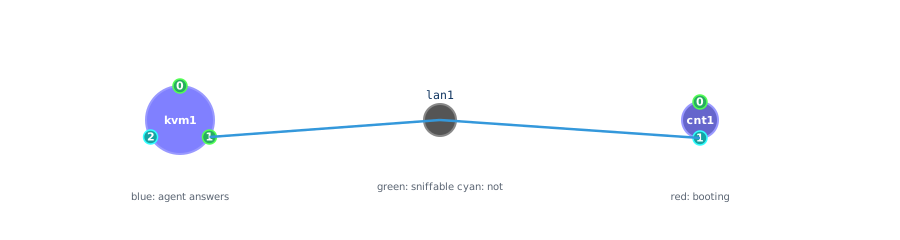
The topology is drawn live. A machine's colour follows its state: dark red down, bright red booting, blue up with its agent answering. The nodes are placed by a force-directed layout that keeps running; Lock into place in the menu of a node pins it, and cnf <n> x= y= / cnf <n> eth<i> angle= on the command line do the same. A pinned place is held by the server for as long as the net has objects, so a reload of the page, or a second browser, draws the items where they were put; an emptied net, del all, forgets them, and the next topology is framed to the window as the first one was.
13.4. Cabling
double-click a lan          it turns purple, selected
single-click a port         the cable is drawn
double-click a machine      root shell in a panel
double-click a green port   webshark on that interface
13.5. The panels
Consoles, desktops, webshark, plots and dialogs open as floating panels. The title bar closes a panel or moves it to its own browser tab, carrying the live connection: a console keeps its scrollback, a capture keeps running.
Console      xterm.js on a root shell, the network of the guest not involved
Desktop      noVNC on the graphical output of a kvm; no usb redirection;
             the C-A-D button at the top right sends Ctrl+Alt+Del
webshark     the packet list and the detail tree; can stop and save a .pcap
PlotTraffic  live throughput of one interface, tx and rx
Tune         the sliders of the layout engine
Tune a2b     loss, delay, rate per direction, applied live
13.6. The Demo panel and its History popup
The Demo button of the header opens the Demo panel. Play opens a picker showing the packages of the chapter Learning with cloonix, 0 to 11, each with its demos in the order and with the line of that chapter; a click on a demo plays it. The list is the file /usr/share/cloonix/demos/packages. While a demo plays, the canvas fits its drawing against the low edge of the view, under the two panels; a drawing taller than the free space continues behind them. Two panels then work side by side:
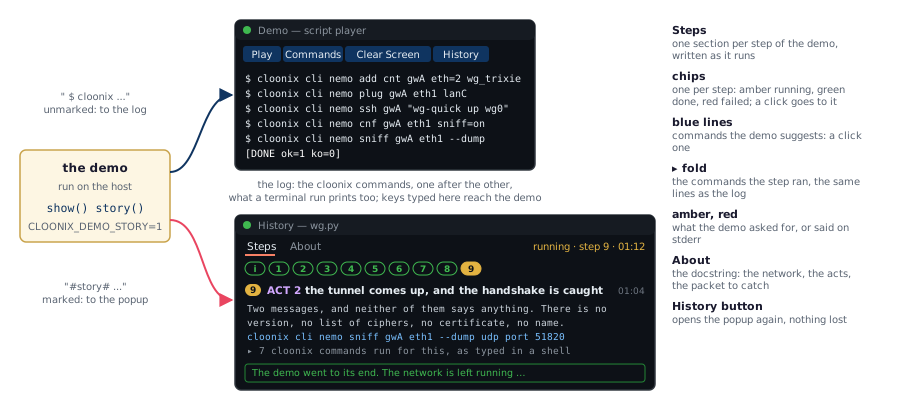
The log, in the Demo panel, receives the cloonix commands of the demo and nothing else, one after the other, each as it can be typed in a shell. It is what the same demo prints when it is played from a terminal.
The History popup opens beside it, titled History -- <demo>, and explains the demo. It has two views:
Steps is written while the demo runs, one section per step.
The first section, i, is the introduction: the title of the demo, then for a demo about a protocol its history, where it comes from and who wrote the software under study, and the drawing of the network.
Each following section is a step of the demo: its number, its title, the time into the run at which it started, and under it what the demo has to say, why the step is there, what was measured or captured, what it proves. A step that is an act of the demo has ACT n in front of its title.
Under the text of a step, a folded line, n cloonix commands run for this, holds the commands the step gave the server, the same lines as the log. Unfolded, a step reads as a worked example: the goal, the commands, the result.
A line in blue is a command the demo suggests to try; a click copies it, ready to paste in a shell. The demos end with several.
A line in amber is something the demo asks for, the Enter it waits for at a published port for instance, which is typed in the log. A line in red is what the demo said on its error output.
The row of chips under the tabs is the table of contents: one chip per step, amber while it runs, green once done, red if the demo failed there; a click goes to the step. The status at the right of the tabs gives the step in progress and the time elapsed, then done or failed.
The view follows the run; scrolling up to read stops that, going back to the bottom resumes it.
The last box says how the demo ended. A demo leaves its network running, so what it explained can be tried at once.
About is known before the demo runs: the docstring at the top of its file. It holds the network as ascii art, the acts, the image the demo needs, its size, and the packet to catch, the sniff commands that put the subject of the demo on the screen, packet by packet.
The popup can be moved, resized and closed like any panel. The History button of the Demo panel opens it again with everything the current demo said; the next Play starts a new history.
At its start a demo says in one sentence what it shows, the line of demos/voice. sound off silences the voice, sound on says the sentence again. stop and del kills every demo going on and erases the net; the Demo panel stays for the next Play.
The history exists on the canvas only. Played from a shell, a demo prints its commands and its failures:
cloonix cli nemo demo security/wg.py
and a reader who wants the text there all the same sets CLOONIX_DEMO_STORY=1, each line of the history then arriving with #story# in front of it.
13.6.1. The commands of a topology
Commands prints in the log of the panel the commands that rebuild the net as it is, those of dump commands: the items, their lans and airs, the captures, the settings and the places. Nothing is written: they are the start of a demo of one's own, a python programme written by hand.
13.6.2. Where a demo runs
A demo played from the panel runs where the server is: the gui server reads the file from its own disk and hands the text to proxymous, which runs it on the host. What the browser sent is only the name. A key typed in the log of the panel reaches the demo as a line on its stdin: a demo that stops to let a page be opened, cloonix/nginx.py and cloonix/nat.py at their published port, waits for it, and goes on when Enter is typed in the panel or in the terminal the demo runs from. Played from a shell, the same file runs on your machine.
/usr/share/cloonix/demos is sticky and shared by every user of the machine; the shipped demos belong to root, a saved one belongs to its author.
13.8. webshark
One capture per interface, one dumpcap per capture started with the interface and shared by webshark and PcapRec. The panel shows the rows as they are dissected, 256 to a message, and keeps the last 20000 drawn; the server keeps the last 500000 frames and the bytes of the last 200000, and stops the capture at that ceiling with a red line saying so. Closing the panel stops the process; a double-click on the same dot starts a fresh one.
The filter box takes a wireshark display filter, applied in the server before the rows cross the network:
icmp
tcp.port == 80
ip.addr == 192.168.1.1
ip.src == 10.0.0.0/24 && !dns
A viewer that reads slower than the capture is told so in the bar under the filter and loses rows of its own only; the capture and the other viewers of the interface are not held back. Stop freezes the list, Save writes it as a .pcap, on the machine of the server at the path asked, or as a download of the browser.
13.9. Overlays
UNABLE TO CONNECT    the page lost the gui server: socket closed, or four seconds without the beat
NET IS DOWN          the page is served but the net is not running; it reconnects on its own
RELOAD THIS PAGE     the build stamp of the server changed under an open page; ctrl-shift-R
The drawing and every panel are emptied on a disconnect; the positions dragged by hand are kept. The header shows the build stamp of the scripts, js Aug 2 2026 16:27:18, stamped by jscloonix/cmd.
User documentation ‹ 12. The insider agent › 14. The demos of cloonix